
Is your TCL TV blinking a white light and leaving you frustrated? You’re not alone, and the good news is that this problem often has simple fixes.
That blinking white light can mean different things, from power issues to software glitches, but understanding what’s behind it is the first step to getting your TV back to normal. Keep reading, and you’ll discover easy solutions that can save you time, money, and the headache of calling for repairs.
Don’t let that blinking light control your TV experience—take charge now!
Common Causes Of Blinking White Light
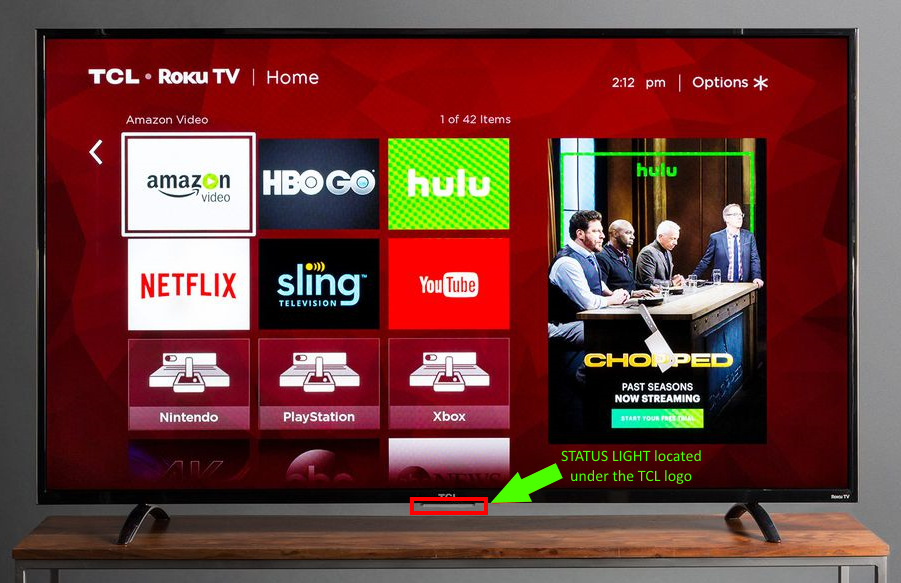
The blinking white light on a TCL TV often signals an underlying problem. Understanding common causes helps fix the issue faster. The light can blink for several reasons. These relate to power, software, remote control, or hardware faults.
Power Supply Issues
Power problems are the top cause of blinking white lights. Loose cables or faulty power outlets can disrupt the TV’s operation. A damaged power cord or unstable voltage may also trigger the blinking. Check the power source and connections carefully.
Firmware Glitches
Firmware controls the TV’s functions. Bugs or failed updates can cause the white light to blink. Sometimes the system freezes or behaves oddly. Restarting or updating the firmware often solves these glitches.
Remote Control Interference
Remote signals can confuse the TV’s sensor. A stuck button or low battery might send wrong commands. This causes the TV’s light to blink repeatedly. Testing the remote or removing it can identify this issue.
Hardware Malfunctions
Internal hardware failures also cause blinking lights. Problems with the main board or screen can trigger alerts. Overheating or damaged components may lead to this behavior. Professional repair might be necessary in such cases.
Credit: support.tcl.com
Basic Troubleshooting Steps
When a TCL TV shows a blinking white light, it signals a problem. Basic troubleshooting can help fix this issue quickly. The steps below are easy to follow. They do not need special tools or skills. Try these first to see if the TV starts working again.
These steps address common causes of blinking lights. They help you check the TV’s power and settings. Doing this saves time and might avoid calling for repair.
Unplug And Restart
Unplug the TV from the power outlet. Wait for about 60 seconds. This pause allows the TV to reset internally. Plug the TV back in and turn it on. This simple step can clear temporary glitches.
Check Power Connections
Make sure the power cord is securely plugged in. Check both the TV and the wall outlet ends. Look for any damage or fraying on the cord. A loose or damaged power connection can cause blinking lights.
Reset The Tv
Locate the reset button or pinhole on the TV. Use a small object like a paperclip to press it. Hold the button for 10 to 15 seconds. This resets the TV to factory settings. It can fix software bugs causing the blinking light.
Inspect The Remote Control
Remove batteries from the remote control. Check if any buttons are stuck or pressed down. Replace the batteries with new ones. Sometimes, a faulty remote causes the TV to blink or behave oddly.
Advanced Fixes For Persistent Flicker
The persistent blinking white light on your TCL TV can be frustrating. Basic solutions may not solve the issue. Advanced fixes require more steps and care. These methods focus on the TV’s software and hardware to fix the flicker. Follow each step carefully to avoid damage.
These advanced fixes help you understand and address the root cause. The goal is to restore your TV’s normal function without professional help. Start with the easiest method and move to the next if needed.
Update Tv Firmware
Outdated firmware can cause the white light to blink. Check if your TCL TV has the latest software version. Use the TV menu to find the update option. Connect to the internet and download any available updates. Installing updates can fix bugs and improve performance. Restart the TV after updating to apply changes.
Factory Reset
Factory reset erases all settings and data on your TV. This step clears any software glitches causing the flicker. Use the TV settings menu to start the reset. The process takes a few minutes and the TV will restart. Resetting can solve deep software errors. Backup important settings before proceeding.
Inspect Internal Components
Loose or damaged parts inside the TV may cause blinking lights. Carefully check the power board and cables. Look for burn marks or swollen capacitors. If comfortable, open the TV back panel using proper tools. Avoid touching other components to prevent damage. If unsure, skip this step and seek help.
Contacting Tcl Support
Contact TCL support if flickering continues after fixes. They offer expert advice and repair options. Provide your TV model and details about the issue. Support can guide you through troubleshooting or arrange a service. Keep your purchase information ready for faster assistance.

Credit: www.youtube.com
Preventive Tips To Avoid Future Flickering
Preventing your TCL TV from blinking white light saves time and stress. Simple steps protect your TV and keep it working well. Follow these easy tips to avoid flickering issues later.
Use Surge Protectors
Surge protectors guard your TV from power spikes. Sudden surges can damage internal parts. Plug your TCL TV into a good surge protector. It helps stop flickering caused by electrical problems.
Keep Software Updated
TV software updates fix bugs and improve performance. Outdated software may cause screen flickering. Check for updates in your TV’s settings. Install updates regularly to keep your TV stable.
Proper Ventilation
Overheating can cause your TV to blink white light. Make sure your TV has space around it for air flow. Avoid placing it in tight or hot areas. Good ventilation helps your TV cool down and work better.
Avoid Unstable Power Sources
Unstable power sources cause flickering and damage. Use a stable power outlet dedicated to your TV. Avoid sharing the outlet with many devices. Stable power keeps your TCL TV running smoothly.
Credit: www.reddit.com
Frequently Asked Questions
Why Is My Tcl Tv Blinking A White Light?
A blinking white light usually means the TV is in standby mode. It may also signal a power or firmware issue.
How Can I Fix Tcl Tv Blinking White Light?
Try unplugging the TV for a minute, then plug it back in. Check for firmware updates if the light keeps blinking.
Does Blinking White Light Mean Tcl Tv Has Hardware Problems?
Not always. It can be a simple software glitch or power issue. Hardware faults are less common but possible.
Can A Power Surge Cause Tcl Tv White Light Blinking?
Yes, a power surge can disrupt the TV’s normal function. Using a surge protector can help prevent this issue.
When Should I Contact Tcl Support For Blinking White Light?
If the blinking continues after power cycling and updates, contact support. Persistent blinking may require professional repair.
Conclusion
A blinking white light on your TCL TV usually signals a simple issue. Try unplugging the TV, waiting a few minutes, then plugging it back in. Check the remote and power source too. If the light keeps blinking, a software update or a reset may help.
Small fixes often solve this problem. Don’t panic or rush repairs. Take your time to follow these steps carefully. Your TV should work normally soon. Stay patient, and keep your TV’s manual handy for extra help.