
Are your AirPods blinking amber and leaving you confused? You’re not alone.
That little flashing light can be frustrating when you don’t know what it means or how to fix it. But don’t worry—understanding why your AirPods are blinking amber is easier than you think. You’ll discover simple reasons behind the blinking and quick steps you can take to get your AirPods working perfectly again.
Keep reading to unlock the secrets behind that stubborn amber light and get back to enjoying your music hassle-free.

Credit: www.youtube.com
Why Airpods Blink Amber
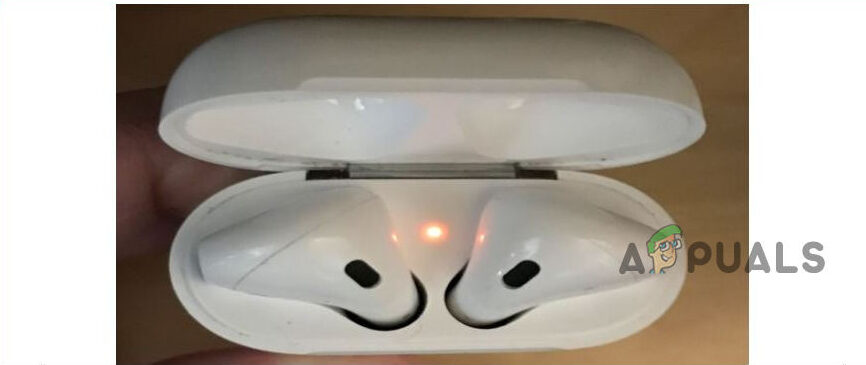
AirPods blinking amber is a sign that something needs attention. This light warns users about issues with charging or connection. Understanding why AirPods blink amber helps fix problems fast. It saves time and keeps your AirPods working well.
Battery Issues
AirPods blink amber when the battery is low. The case or earbuds may not hold enough charge. This happens if the battery is almost empty. You need to charge them fully to stop the amber light. Sometimes, old batteries cause this blinking too.
Charging Case Problems
The charging case can cause the amber light to blink. Dirt or debris inside the case blocks connection. This stops AirPods from charging properly. A faulty charging port also triggers the amber blink. Cleaning the case or fixing the port helps.
Firmware Glitches
AirPods use software called firmware to work right. Bugs or glitches in firmware cause the amber blinking light. Firmware errors affect charging and syncing. Updating or resetting the AirPods can fix these glitches. This clears the amber warning.
Quick Fixes For Amber Light
The amber light on your AirPods case signals a problem. It often means the AirPods are not charging properly. Quick fixes can help solve this issue fast. Try these easy steps to get your AirPods working again.
These fixes are simple and require no special tools. Follow each step carefully for the best results.
Reset Your Airpods
Press and hold the button on the back of the case. Keep holding until the light flashes white. This resets the AirPods and clears any glitches. After resetting, reconnect your AirPods to your device. This often fixes the amber light problem.
Clean Charging Contacts
Dirt or dust can block charging contacts. Use a soft, dry cloth to clean the AirPods and case contacts. Avoid using water or liquids as they can cause damage. Clean contacts improve charging and may stop the amber light.
Charge Fully And Reconnect
Plug your AirPods case into a charger and let it charge fully. A low battery can cause the amber light to blink. After full charge, open the case near your device. This helps your AirPods reconnect properly. Check if the amber light disappears.
Troubleshooting Charging Case
AirPods blinking amber usually means a problem with the charging case. The case may not charge properly or connect with the AirPods.
Troubleshooting the charging case helps find the root of the issue. Simple checks can fix most problems and save time.
Check For Debris Or Damage
Look inside the charging case for dust or dirt. Small particles can block the connection between AirPods and case.
Use a soft, dry cloth or a small brush to clean the case gently. Avoid using liquids or sharp tools.
Also, check for cracks or dents. Physical damage may stop the case from charging properly.
Use A Different Charger
Try charging the case with another power adapter. Some chargers might not work well with AirPods cases.
A charger with the right power output ensures proper charging. Avoid low-quality or damaged chargers.
Test the case with a wall charger instead of a USB port on a computer. Wall chargers usually deliver more power.
Inspect Charging Cable
Check the charging cable for cuts or bends. Damaged cables can stop the case from charging.
Use a different cable that fits the charging case. Make sure it is Apple-certified or a quality third-party cable.
Keep cables straight and avoid pulling them at sharp angles to extend their life.

Credit: www.bibliotecaoscura.com
Battery Health Tips
Taking care of your AirPods’ battery helps keep them working well longer. Healthy battery life stops the blinking amber light. Follow these easy tips to protect your AirPods’ battery.
Avoid Overcharging
Do not leave AirPods charging all night. Overcharging can harm the battery’s lifespan. Unplug the charger once AirPods reach 100% charge. Use original or certified chargers only.
Store Properly When Not In Use
Keep AirPods in their case when not in use. Store the case in a cool, dry place. Avoid exposing AirPods to extreme heat or cold. Proper storage keeps the battery safe and stable.
Update Firmware Regularly
Keep AirPods’ firmware up to date. Updates fix bugs and improve battery efficiency. Connect your AirPods to your iPhone to check for updates. Updated software helps prevent battery issues.
When To Contact Apple Support
Knowing when to contact Apple Support about your AirPods blinking amber saves time and frustration. Some issues require expert help beyond simple fixes. This section explains clear signs to reach out for professional support. It guides you on what to expect from Apple’s service options.
Persistent Amber Light
The amber light should not blink continuously. If it does, your AirPods may have a deeper problem. Try resetting them first. If the amber light stays on after multiple attempts, contact Apple Support. Persistent blinking means the charging case or AirPods could be faulty.
Physical Damage Concerns
AirPods exposed to water or drops might show the amber light. Physical damage can cause charging and connection issues. Apple Support can check for hidden damage. They provide advice on repair or replacement options. Don’t ignore damage signs to avoid worsening the issue.
Warranty And Service Options
Apple offers warranty coverage for certain AirPods problems. Check if your AirPods are still under warranty before contacting support. Out-of-warranty repairs are also available but may cost more. Apple Support will explain the best service choices based on your situation.
Credit: www.bibliotecaoscura.com
Frequently Asked Questions
Why Are My Airpods Blinking Amber Light?
A blinking amber light means your AirPods need charging or have a connection issue. It signals low battery or pairing problems. Try placing them back in the case to charge.
How Long Does Amber Blinking Last On Airpods?
The amber blinking usually lasts a few seconds while charging or pairing. If it continues longer, it may indicate an error. Check the charging case and AirPods status.
Can Amber Blinking Mean Airpods Need Reset?
Yes, continuous amber blinking can mean your AirPods need a reset. Resetting helps fix connection and software issues. Hold the setup button until the light flashes white.
What To Do If Airpods Blink Amber But Don’t Charge?
If AirPods blink amber and don’t charge, clean the charging contacts. Also, check the charging cable and power source. Replace accessories if they are damaged.
Does Amber Blinking Affect Airpods Performance?
Amber blinking shows a warning but does not directly affect performance. It alerts you to fix battery or connection issues. Ignoring it may cause more problems later.
Conclusion
AirPods blinking amber means they need your attention. It often signals low battery or charging issues. Try placing them back in the case and charging fully. Clean the contacts gently if needed. Resetting the AirPods can fix many problems. If the light still blinks amber, contact Apple support for help.
Taking these steps helps keep your AirPods working well. Keep your device charged and clean for best use. Small fixes can save time and frustration. Stay patient and follow these simple tips.