
Are you staring at your Wii controller blinking blue lights and wondering what it means? It can be confusing when your controller suddenly starts flashing, making it hard to enjoy your game.
But don’t worry—those blinking lights are trying to tell you something important. Understanding why your Wii controller is blinking blue can help you fix the problem quickly and get back to playing. Keep reading, and you’ll learn exactly what those lights mean and how to solve the issue fast.
Your gaming experience is about to get a whole lot smoother!
Credit: www.reddit.com
Why The Wii Controller Blinks Blue
The Wii controller blinking blue can cause confusion for many users. This light signals important information about your controller’s status. Understanding why it blinks helps you fix issues quickly. The blue light mainly shows problems with connection, power, or signal interference.
Connection And Sync Issues
The blue light often blinks when the controller is trying to connect. It means the controller is searching for the Wii console. Sometimes, the sync between the controller and console is lost. The blinking stops once the connection is restored. Pressing the sync button on both devices usually solves this problem.
Battery And Power Concerns
A blinking blue light may signal low battery power. The controller needs enough power to maintain connection. Weak batteries cause the light to flash as a warning. Replacing or recharging batteries can stop the blinking. Always check battery status if the light keeps blinking.
Interference And Signal Problems
Wireless signals can face interference from other devices. This interference may cause the blue light to blink. Objects like walls or electronics can block the signal. Moving closer to the console often fixes the issue. Reducing nearby devices helps keep a stable connection.
Quick Steps To Resync Your Controller
When your Wii controller blinks blue, it means the connection to the console is lost. Resyncing the controller is quick and easy. Follow these steps to get your controller working again fast. Each step solves common syncing problems.
Using The Sync Button On The Wii Console
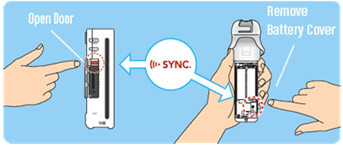
First, turn on your Wii console. Find the small red sync button inside the SD card slot. Press this button once. Then, open the battery cover on your Wii controller. Press the red sync button inside the controller. The blue lights will blink faster. Wait until one light stays solid. This means your controller is synced.
Resetting The Controller
Try resetting the controller if syncing fails. Remove the batteries from the controller. Wait 10 seconds. Put the batteries back in. Press the power button on the controller. Repeat the syncing process using the sync buttons on both devices.
Checking Controller Batteries
Weak batteries can cause blinking blue lights. Remove the controller’s battery cover. Check the batteries for leaks or damage. Replace with fresh, new batteries. Make sure they fit correctly. Turn on the controller and try syncing again.
Troubleshooting Battery Problems
Wii controllers blinking blue lights often point to battery issues. Battery problems stop your controller from working well. Fixing these issues is simple with some basic steps. This guide helps you solve battery problems easily.
Replacing Batteries Correctly
Open the battery cover on the back of the controller. Take out old batteries carefully. Insert new AA batteries the right way. Match the plus (+) and minus (-) ends to the marks inside. Close the battery cover firmly. Test the controller to see if the blue light stops blinking.
Charging Rechargeable Battery Packs
Use only the charger made for your Wii controller pack. Plug the charger into a power source. Connect the controller to the charger using the correct port. Let it charge fully before use. Charging time varies; usually, it takes a few hours. Avoid overcharging to keep the battery healthy.
Battery Life Tips
Turn off the controller when not in use. Remove batteries if you won’t use the controller for long. Store batteries in a cool, dry place. Avoid mixing old and new batteries together. Clean battery contacts gently to keep a good connection. These habits extend your controller’s battery life.
Credit: www.nintendo.com
Reducing Wireless Interference
Wireless interference can cause the Wii controller’s blue lights to blink. This blinking means the controller has trouble connecting to the console. Reducing interference helps keep the connection strong and smooth. Some simple steps can improve your gaming experience.
Clearing Nearby Electronic Devices
Many devices send signals that interfere with the Wii controller. Move phones, tablets, and other wireless gadgets away from the console. Turn off devices that are not needed during play. This reduces signal clashes and stops the blinking blue lights.
Adjusting Wii Console Placement
Place the Wii console in an open space. Avoid spots near metal objects or thick walls. These block signals and cause interference. Keep the console at a medium height, like a shelf or table. This helps the controller connect clearly and steadily.
Using The Console In Different Rooms
Try moving the console to a different room. Some rooms have less wireless noise. This makes it easier for the controller to connect. Rooms with fewer devices or walls can reduce interference. Experiment with locations to find the best spot.
Advanced Fixes For Persistent Blinking
Persistent blinking blue lights on your Wii controller can be frustrating. Basic fixes may not always work. Advanced steps help solve deeper issues. These methods often restore connection and improve performance.
Follow these advanced fixes carefully. They address software and hardware problems. Each step can bring your controller back to normal.
Resetting The Wii Console
Resetting the Wii console can clear many issues. Turn off the Wii and unplug it from power. Wait for about five minutes. Plug it back in and turn it on. This resets the hardware and refreshes connections. It can fix blinking lights caused by temporary glitches.
After reset, re-sync the controller with the console. Press the red sync button on the Wii and controller. The blinking should stop once they connect properly.
Updating Wii System Software
Outdated software can cause controller problems. Check if your Wii system needs an update. Go to Wii Settings and select “Wii System Update.” Connect to the internet and download the latest version. Updates fix bugs and improve device communication.
After updating, test the controller again. The blinking blue lights may stop if software was the issue.
When To Consider Controller Replacement
Sometimes blinking blue lights mean the controller is faulty. If reset and updates do not help, the controller might be damaged. Internal parts or batteries can wear out over time. Consider replacing the controller if problems continue.
Try using a different controller to check if the issue is with the console or the device. Persistent blinking after tests means it is time for a new controller.
Credit: www.reddit.com
Frequently Asked Questions
Why Is My Wii Controller Blinking Blue Lights?
Blinking blue lights on a Wii controller show it is searching for the console. The controller tries to connect wirelessly to the Wii system. This happens when it is not synced yet.
How Do I Stop The Wii Controller From Blinking Blue?
Press the red sync button on the Wii console and the controller. This will pair the controller with the console. Once connected, the blinking stops.
What Does Rapid Blinking On Wii Controller Mean?
Rapid blinking means the controller has low battery power. Replace or recharge the batteries to fix this issue. The controller will stop blinking once powered up.
Can Multiple Wii Controllers Blink Blue At The Same Time?
Yes, each controller blinks blue when syncing with the Wii. Up to four controllers can connect and blink together. Each light shows a player number after syncing.
Is A Blinking Blue Light A Sign Of Controller Damage?
Not always. Blinking blue lights usually mean connection or battery issues. If blinking continues after syncing and battery changes, the controller might need repair.
Conclusion
Wii controller blinking blue lights often show connection status. They can mean syncing, low battery, or error signals. Try turning the controller off and on again. Make sure the batteries have enough power. Press the sync button on both controller and console.
Keep the controller near the Wii for better connection. If lights still blink, check for interference from other devices. Simple steps fix most blinking light problems. Enjoy your gaming without interruptions. Stay patient; solutions are usually easy to find.