
Is your Samsung refrigerator’s temperature light blinking and leaving you worried? You’re not alone.
When your fridge’s temp indicator starts flashing, it can be confusing and even stressful. You might wonder if your food is safe or if the appliance is about to break down. But don’t panic just yet. Understanding why your Samsung fridge temp is blinking and what you can do about it can save you time, money, and frustration.
Keep reading, and you’ll learn simple steps to fix this issue and keep your fridge running smoothly.

Credit: www.youtube.com
Reasons For Blinking Temperature Display
The blinking temperature display on your Samsung refrigerator signals an issue. It warns you that the fridge is not working as it should. This blinking helps you spot problems early. You can fix them before they get worse.
Several reasons cause the temperature display to blink. Understanding these reasons helps you know what to check. This guide explains the common causes and what they mean.
Power Fluctuations And Resets
Power changes can confuse the fridge’s system. Sudden power cuts or surges make the display blink. The fridge resets to protect its parts. This blinking shows the fridge is rebooting.
Frequent power issues may damage the fridge. Use a stable power source or surge protector. This keeps the fridge safe and stops blinking.
Door Left Open
Leaving the fridge door open causes the display to blink. The fridge senses warm air coming inside. This raises the temperature inside quickly. The blinking warns you to close the door.
Check the door seal too. A weak seal lets cold air escape. It can also cause blinking and temperature rise.
Temperature Sensor Issues
The fridge uses sensors to check the temperature. A broken or dirty sensor sends wrong signals. The display blinks to show a sensor problem. This stops the fridge from cooling right.
Cleaning or replacing the sensor fixes this issue. It helps the fridge keep the right temperature.
Faulty Thermostat
The thermostat controls the fridge’s cooling cycle. A bad thermostat causes wrong temperature readings. The display blinks to alert this fault. The fridge may get too cold or warm.
Replacing the thermostat restores normal fridge operation. It stops the blinking and keeps food fresh.
Frost Buildup Problems
Frost inside the freezer blocks air flow. This makes the fridge work harder. The temperature display blinks to warn of frost buildup. Frost can cause uneven cooling and damage parts.
Defrost the fridge regularly to avoid frost buildup. This keeps the temperature steady and blinking away.
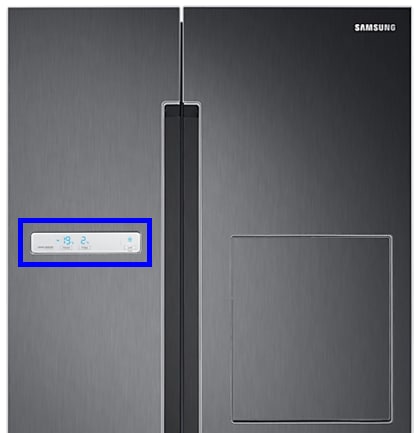
Credit: www.samsung.com
Simple Fixes To Stop Blinking
The blinking temperature display on your Samsung refrigerator can be annoying. It often signals a small problem that you can fix yourself. Simple steps can stop the blinking and help your fridge run smoothly again. Try these easy solutions to solve the issue quickly.
Resetting The Refrigerator
Unplug the refrigerator from the power outlet. Wait for about five minutes. Plug it back in. This resets the system and can clear the blinking error. The display should stop blinking if the reset worked.
Checking And Closing The Door Properly
Open the fridge door and check for any objects blocking it. Close the door firmly to ensure a tight seal. A door that is not fully closed can cause the temperature light to blink.
Adjusting Temperature Settings
Locate the temperature control panel inside the fridge. Set the fridge temperature to 37°F (3°C) and the freezer to 0°F (-18°C). Adjusting the settings helps the fridge maintain the right temperature and stops blinking.
Cleaning The Condenser Coils
Unplug the fridge and locate the condenser coils, usually at the back or underneath. Use a brush or vacuum to remove dust and dirt. Clean coils improve cooling and reduce blinking alerts.
Defrosting The Freezer
Ice build-up in the freezer can cause the temperature to blink. Turn off the fridge and open the freezer door. Let the ice melt completely. Wipe away water and restart the fridge to stop blinking.
When To Call A Technician
The blinking temperature light on your Samsung refrigerator can be worrying. Sometimes, simple resets fix the issue. Other times, it signals a deeper problem. Knowing when to call a technician saves time and avoids more damage.
Signs of serious issues need expert help. Trained technicians have the tools and skills to diagnose and repair your fridge safely. Watch for certain warning signs that mean it is time to get professional support.
Persistent Blinking Despite Fixes
If the fridge temperature light keeps blinking after you try basic fixes, call a technician. Resetting the fridge or adjusting the temperature should stop the blinking. Continued blinking may mean a faulty sensor or control board needs repair.
Unusual Noises Or Smells
Strange sounds like buzzing, clicking, or grinding can indicate mechanical problems. Odd smells, such as burning or moldy odors, also need attention. These issues can worsen and cause more damage without professional help.
Water Leakage Issues
Water pooling inside or outside the fridge is a sign of a problem. Leaks can cause electrical faults or food spoilage. A technician can find the source and fix leaks before they cause serious harm.
Error Codes On Display
Error codes on your Samsung fridge display provide clues about the problem. Some codes warn of sensor failures or system errors. Technicians can read these codes and perform the right repairs quickly and safely.

Credit: www.spinchill.com
Preventive Tips For Temperature Stability
Maintaining a steady temperature in your Samsung refrigerator is key to keeping food fresh and avoiding the fridge temperature light blinking. Simple steps can help prevent temperature swings and extend your fridge’s life. These tips focus on easy habits to keep your fridge running smoothly.
Regular Maintenance Schedule
Check your fridge regularly for dust and dirt. Clean the coils every few months to help the fridge cool efficiently. Replace filters on time. Small maintenance tasks stop bigger problems and keep the temperature stable.
Avoid Overloading The Fridge
Do not pack the fridge too full. Overloading blocks air vents and stops cold air from circulating. Leave space between items so cold air can flow freely. This helps keep an even temperature throughout the fridge.
Keep Door Seals Clean
Wipe the door seals with a damp cloth often. Dirty seals do not close tightly. If cold air escapes, the fridge works harder and the temperature may blink. Clean seals keep the door sealed and the temperature steady.
Proper Placement Away From Heat Sources
Place the fridge away from direct sunlight and heat sources like ovens or heaters. Heat makes the fridge work harder to stay cool. A cooler spot helps keep the internal temperature steady and prevents blinking alerts.
Frequently Asked Questions
Why Is My Samsung Fridge Temperature Blinking?
A blinking temperature means the fridge is adjusting after being unplugged or opened. It can also signal a temperature sensor issue or door left open. Check if the door is closed properly and let it settle.
How Do I Stop The Fridge Temp From Blinking?
Make sure the fridge door is fully closed and not blocked. If blinking continues, reset the fridge by unplugging it for 5 minutes. This often clears temporary errors.
Does Blinking Temperature Affect Fridge Cooling?
Blinking itself doesn’t always mean poor cooling but signals a problem. If the fridge isn’t cold enough, it may need repair. Monitor the temperature and call service if it stays abnormal.
Can I Fix Samsung Fridge Temp Blinking Myself?
Simple fixes include closing the door properly and resetting power. Cleaning door seals can help too. For sensor or control board issues, contact a professional technician.
What Causes Samsung Fridge Temperature Sensor To Blink?
A faulty or disconnected temperature sensor often causes blinking. Power surges or mechanical faults can also trigger this. Proper diagnosis is key to prevent cooling problems.
Conclusion
A blinking temperature on your Samsung fridge signals a problem. Check the door seal and temperature settings first. Clean the condenser coils if needed. Make sure the fridge is not overloaded. If the blinking continues, call a professional for help.
Regular maintenance keeps your fridge running well. Don’t ignore blinking lights; they protect your food. Stay calm and follow simple steps to fix the issue. Your fridge will be back to normal soon.