
Is your LG dryer showing a blinking “Flow Sense” light, and you’re not sure what it means? You’re not alone, and it can be frustrating when your dryer doesn’t work as expected.
This blinking signal is trying to tell you something important about your dryer’s performance. Understanding what “Flow Sense Blinking” means will help you fix the issue quickly and avoid bigger problems down the road. Keep reading, and you’ll learn exactly what to do to get your dryer back to running smoothly.
Flow Sense Indicator Meaning
The Flow Sense indicator on an LG dryer shows important information about the dryer’s vent system. It helps you know if the vent needs cleaning. This light keeps your dryer running safely and efficiently. Paying attention to it prevents bigger problems.
Understanding what triggers the Flow Sense light and why it matters can help you maintain your dryer better. It also saves energy and reduces drying time.
What Triggers The Flow Sense Light
The Flow Sense light turns on when the dryer’s vent is blocked or dirty. Lint and debris build up in the vent over time. This reduces airflow and causes the sensor to alert you. The sensor checks the air movement inside the vent. Poor airflow makes the light blink or stay on.
Other reasons include a kinked vent hose or a loose connection. These issues affect how air flows out of the dryer. Cleaning the vent and fixing these problems will turn off the light.
Why It Matters For Dryer Performance
Good airflow is key to drying clothes quickly and safely. The Flow Sense light warns you about airflow problems. Ignoring it can cause the dryer to overheat. Overheating can damage the dryer or even start a fire.
Also, a blocked vent makes the dryer work harder. This wastes energy and increases your electricity bill. Fixing vent issues improves drying speed and saves money. It also extends the life of your dryer.
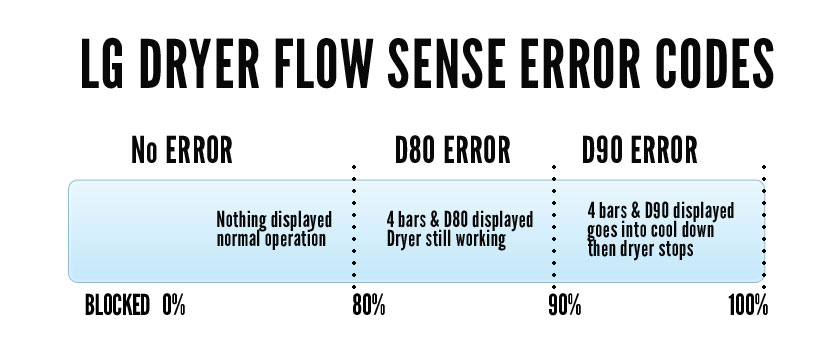
Credit: dryerventcleaner.ca
Common Causes Of Flow Sense Blinking
The Flow Sense light blinking on an LG dryer warns about airflow issues. It signals a problem that stops the dryer from working well. Knowing the common causes helps fix the problem fast. Most causes relate to blocked air paths or dirty parts.
Clogged Lint Filter
The lint filter catches dust and fibers from clothes. When it clogs, air cannot flow freely. This stops the dryer from drying clothes properly. Cleaning the lint filter after every use helps the dryer work better. A clogged filter often causes the Flow Sense light to blink.
Blocked Vent Hose
The vent hose carries hot air outside. Dust and lint can block this hose. A blocked vent hose traps heat and moisture inside. This makes the dryer less efficient and triggers the Flow Sense alert. Checking and cleaning the vent hose regularly can prevent this issue.
Dirty Dryer Drum Or Vent
The drum and vent can collect dust and lint over time. Dirt buildup reduces airflow and can cause the Flow Sense light to blink. Wiping the drum and cleaning the vent system keeps air moving smoothly. Regular cleaning helps maintain dryer performance and safety.
Step-by-step Quick Fixes
When the Flow Sense light blinks on your LG dryer, it usually means the airflow is blocked. This can stop the dryer from working well. Fixing this issue often takes just a few simple steps. These quick fixes help clear the airflow path so your dryer can work properly again.
Follow these easy steps to clear the blockage and get your dryer running smoothly. Each step focuses on a key area that can cause airflow problems. Cleaning and checking these parts often solves the problem fast.
Cleaning The Lint Filter
Start by removing the lint filter from your dryer. Use your hands or a soft brush to clear out all the lint. Make sure no lint is stuck around the edges. Rinse the filter with water if needed. Let it dry completely before placing it back. This helps keep the air flowing freely through the dryer.
Inspecting And Clearing The Vent Hose
Next, unplug the dryer and pull it away from the wall. Find the vent hose connected at the back. Disconnect the hose carefully. Check inside for any lint clogs or blockages. Use a vacuum or a long brush to clean inside the hose. Reattach the hose firmly to the dryer and wall vent. This ensures air can move out without any block.
Checking The Dryer Drum And Vent
Open the dryer door and look inside the drum. Remove any objects or lint buildup you see. Look for damage or anything blocking the vent inside the drum. Also, check the vent opening on the outside of your home. Clear any debris, leaves, or nests blocking it. Good airflow through the drum and vent keeps your dryer safe and efficient.

Credit: applianceexpresstx.com
Preventive Maintenance Tips
Preventive maintenance helps keep your LG dryer running smoothly. It reduces the chance of errors like the Flow Sense blinking. Simple steps can extend your dryer’s life and improve safety.
Regular Lint Filter Cleaning
Clean the lint filter after every load. Lint buildup blocks airflow and causes the Flow Sense error. Use your hands or a soft brush to remove lint. This keeps your dryer efficient and safe.
Proper Ventilation Setup
Check that your dryer vent is clear and straight. Avoid sharp bends that trap lint and restrict airflow. Use rigid or semi-rigid metal ducts for better ventilation. Good airflow prevents overheating and error messages.
Scheduled Dryer Vent Inspections
Inspect your dryer vent at least once a year. Look for lint buildup or damage inside the vent. Clean or repair the vent as needed. This prevents blockages that trigger the Flow Sense warning.
When To Contact A Professional
The Flow Sense blinking on your LG dryer can be confusing. Sometimes, the issue is simple to fix. Other times, it needs expert help. Knowing when to contact a professional saves time and avoids damage.
Persistent Flow Sense Issues
If the Flow Sense light keeps blinking after cleaning, it signals a deeper problem. The sensor might be faulty or wiring could be loose. Repeated attempts to fix the issue without success mean calling a technician is best.
Signs Of Dryer Malfunction
Unusual noises or the dryer not heating properly are warning signs. Clothes taking too long to dry also suggest a malfunction. These symptoms often link to the Flow Sense sensor or airflow blockages that need expert attention.
Safety Considerations
A blocked or faulty sensor can cause overheating. Overheating raises fire risks and damages your dryer. Professionals have the right tools to check and fix airflow safely. Avoid trying complex repairs yourself to prevent accidents.
Credit: www.lg.com
Frequently Asked Questions
What Does The Flow Sense Blinking Mean On Lg Dryer?
Flow Sense blinking means the dryer detected a clogged vent or lint filter. It signals you to clean the vent and lint trap. This helps the dryer work safely and efficiently.
How Do I Stop Flow Sense Blinking On My Lg Dryer?
Clean the lint filter and dryer vent thoroughly to stop the blinking. Remove any lint or blockages that reduce airflow. Regular cleaning prevents this warning light.
Can Flow Sense Blinking Cause Dryer Problems?
Yes, it can cause longer drying times and overheating. Blocked vents reduce airflow, making the dryer work harder. Fixing it improves drying and safety.
How Often Should I Clean The Vent To Avoid Flow Sense?
Clean the vent at least once a year or more if used heavily. Check the lint filter before every load. This keeps the dryer running well and safe.
Does Flow Sense Blinking Affect Dryer Warranty?
Ignoring Flow Sense warnings can void your LG dryer warranty. It shows lack of maintenance, which may cause damage. Follow cleaning advice to keep your warranty valid.
Conclusion
The Flow Sense blinking on your LG dryer signals a need for attention. Check for lint buildup or blockages in the vent system. Cleaning these parts often stops the blinking and improves dryer performance. Regular maintenance helps your dryer work better and last longer.
Stay alert to these signs to avoid bigger problems later. Simple care keeps your laundry routine smooth and trouble-free.