
Have you ever noticed your Canon battery charger blinking orange and wondered what it means? That little blinking light might seem harmless, but it could be trying to tell you something important about your camera’s power.
If you rely on your Canon camera for capturing special moments, understanding this blinking orange light is crucial. Keep reading, and you’ll discover what causes this issue and, more importantly, how you can fix it quickly to get back to shooting without delay.
Don’t let a blinking light stop you—let’s solve this together.

Credit: www.youtube.com
Reasons For Blinking Orange Light
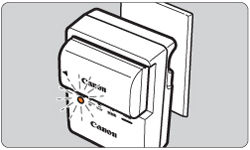
The blinking orange light on a Canon battery charger signals a problem. It warns users that something is wrong with the charging process. Understanding the common reasons helps solve the issue quickly. This saves time and prevents battery damage.
The charger’s orange light can blink for several reasons. Each reason points to a different problem with the battery or charger. Identifying the cause is the first step to fixing the problem.
Battery Overheating Issues
Batteries get hot during charging. If the battery temperature rises too much, the charger stops charging. The orange light blinks to warn about overheating. Heat can damage the battery and reduce its life.
Remove the battery from the charger. Let it cool down in a dry place. Avoid charging in hot environments or direct sunlight.
Faulty Battery Connections
Dirty or loose battery contacts can cause blinking lights. Dust or debris blocks the connection between the charger and battery. This interrupts the charging process. Clean the contacts with a soft cloth or eraser.
Make sure the battery fits properly in the charger. Loose connections prevent the battery from charging correctly.
Charger Malfunctions
The charger itself may have issues. Internal faults or damage can trigger the blinking orange light. Try using a different charger if possible. This helps check if the charger is the problem.
Inspect the charger cable for cuts or wear. Replace the charger if it appears damaged.
Incompatible Batteries
Not all batteries work with every Canon charger. Using the wrong battery causes the charger to blink orange. Check the battery model number. Use only batteries recommended for your charger.
Incompatible batteries may not charge properly or could get damaged.
Credit: support.usa.canon.com
Immediate Troubleshooting Steps
Seeing your Canon battery charger blinking orange can be frustrating. This light usually signals a problem with the charging process. Quick action often solves the issue and gets your charger working again.
Follow these immediate troubleshooting steps to fix the blinking orange light. Each step targets common causes of charging errors.
Resetting The Charger
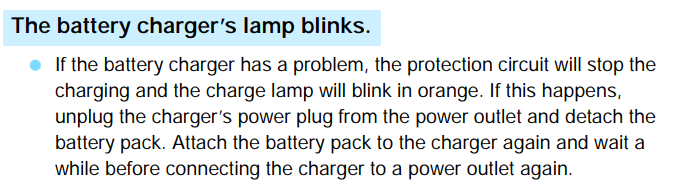
Unplug the charger from the power source. Wait about 30 seconds to one minute. Plug it back in and check if the orange light stops blinking. This resets the charger’s internal system and can clear minor faults.
Checking Battery Placement
Remove the battery from the charger. Look carefully at the battery terminals and charger contacts. Make sure the battery fits snugly in the charger slot. Improper placement often causes connection issues and blinking lights.
Cooling Down The Battery
Overheating can cause the charger to blink orange. Take the battery out and let it cool in a dry, shaded place. Avoid charging immediately after heavy use or exposure to heat. Cool batteries charge more safely and effectively.
Inspecting For Physical Damage
Check the battery and charger for cracks, dents, or corrosion. Damaged parts might prevent proper charging. If you see damage, stop using the charger or battery. Replace damaged components to avoid safety risks.
When To Replace Your Battery
Knowing when to replace your Canon battery is important to keep your camera working well. A blinking orange light on your battery charger often signals a problem with the battery. It may not hold a charge or could be damaged. Replacing the battery at the right time avoids unexpected power loss during shooting sessions.
Signs Of Battery Wear
Batteries show wear in different ways. Your camera might shut off suddenly or fail to turn on. The battery may not charge fully, or the charger light blinks orange. These signs mean the battery is losing its ability to hold power. Physical damage like swelling or leaks also means replacement is needed.
Testing Battery Health
Testing battery health helps confirm if replacement is necessary. Use your camera’s battery info screen to check charge capacity. Some chargers or external testers measure battery voltage and performance. If results show low capacity or irregular voltage, the battery needs replacement. Regular testing saves you from unexpected failures.
Choosing The Right Replacement
Choose a battery that matches your Canon camera model. Official Canon batteries ensure compatibility and safety. Third-party batteries can be cheaper but check reviews carefully. Avoid very cheap or unbranded batteries to prevent damage. Proper storage and charging also extend your new battery’s life.
Avoiding Future Charging Issues
Preventing future charging problems with your Canon battery charger saves time and frustration. Taking simple steps helps keep your charger and battery in good shape. These habits reduce the chance of blinking orange lights and other errors.
Proper Battery Storage
Store batteries in a cool, dry place. Avoid extreme heat or cold. Remove batteries from the charger once fully charged. Keep contacts clean and dry. Use original battery cases or pouches for protection. Proper storage extends battery life and prevents damage.
Regular Maintenance Tips
Clean charger contacts with a soft, dry cloth. Check cables and plugs for damage before use. Avoid using the charger in dusty or wet areas. Inspect batteries regularly for swelling or leaks. Replace old or damaged batteries promptly. Regular checks keep everything working well.
Using Official Accessories
Use only Canon-approved chargers and batteries. Non-official parts may not fit or work correctly. Official accessories ensure safe and reliable charging. They reduce the risk of errors and damage. Invest in genuine products for better performance and safety.
Alternative Charging Options
When your Canon battery charger blinks orange, alternative charging options can keep you shooting. These options help power your camera without waiting for the charger to work again. They come in handy during travel or outdoor shoots.
Portable Chargers And Power Banks
Portable chargers and power banks offer a flexible way to charge camera batteries. They store power and can charge devices multiple times. Choose a power bank with enough capacity for your battery size. Use a compatible cable to connect the charger to the battery or camera. Portable chargers work well when you lack access to wall outlets. They are compact and easy to carry in your camera bag.
Charging Via Camera Usb Port
Many Canon cameras allow charging through the USB port. Connect the camera to a power source using a USB cable. This method charges the battery inside the camera directly. It is convenient for quick top-ups during breaks. USB charging works with power banks, laptops, or car chargers. Always use the original or certified cable to avoid damage. This option is useful if your battery charger blinks orange and won’t charge.
Credit: community.usa.canon.com
Frequently Asked Questions
Why Is My Canon Battery Charger Blinking Orange?
A blinking orange light usually means the battery is charging. It can also indicate a charging error or battery problem.
How Long Should Canon Battery Charger Orange Light Blink?
The orange light blinks for about 1 to 2 hours during charging. If it blinks longer, the battery may have an issue.
Can A Blinking Orange Light Mean A Faulty Battery?
Yes, a blinking orange light can signal a faulty or damaged battery. Try charging a different battery to check.
What Should I Do If Canon Charger Blinks Orange And Won’t Charge?
Unplug the charger and remove the battery. Clean the contacts, then reinsert the battery and try charging again.
Does Temperature Affect The Blinking Orange Light On Canon Charger?
Yes, extreme hot or cold temperatures can cause the charger to blink orange. Charge batteries at room temperature for best results.
Conclusion
A blinking orange light on your Canon charger means attention is needed. Check the battery for damage or dirt. Try using a different power outlet to rule out power issues. Clean the charger contacts gently if they look dirty. Replace the battery if it no longer holds a charge.
Following these steps can help fix the blinking orange light quickly. Stay patient and careful with your camera gear for the best results.