
Are you frustrated by your LED lights blinking when you use a dimmer switch? You’re not alone.
This annoying flicker can disrupt your comfort and make your space feel less cozy. But don’t worry—understanding why this happens is the first step to fixing it. You’ll discover simple explanations and easy solutions to stop your LED lights from blinking on a dimmer.
Keep reading to make your lighting smooth and steady again.
Causes Of Led Lights Blinking On Dimmer
LED lights blinking on dimmer switches can be frustrating. Understanding the causes helps fix the problem quickly. Several factors can lead to this issue. Knowing these causes can save time and money.
Incompatible Dimmer Switches
Not all dimmer switches work with LED bulbs. Some older dimmers are designed for incandescent lights. Using them with LEDs causes flickering or blinking. Choosing a dimmer made for LED lights solves this issue.
Low-quality Led Bulbs
Cheap LED bulbs often have poor internal electronics. This can cause unstable light output and blinking. High-quality bulbs use better parts for smooth dimming. Investing in good LED bulbs reduces flicker problems.
Wiring Issues
Loose or faulty wiring can cause blinking lights. Bad connections create interruptions in the electrical flow. This results in flickering or blinking LEDs. Checking and fixing wiring can stop the blinking.
Voltage Fluctuations
Fluctuating voltage in the home affects LED lights. When voltage drops or spikes, LEDs may blink. This often happens during heavy power use or poor electrical supply. Stabilizing voltage helps keep lights steady.
Load Requirements
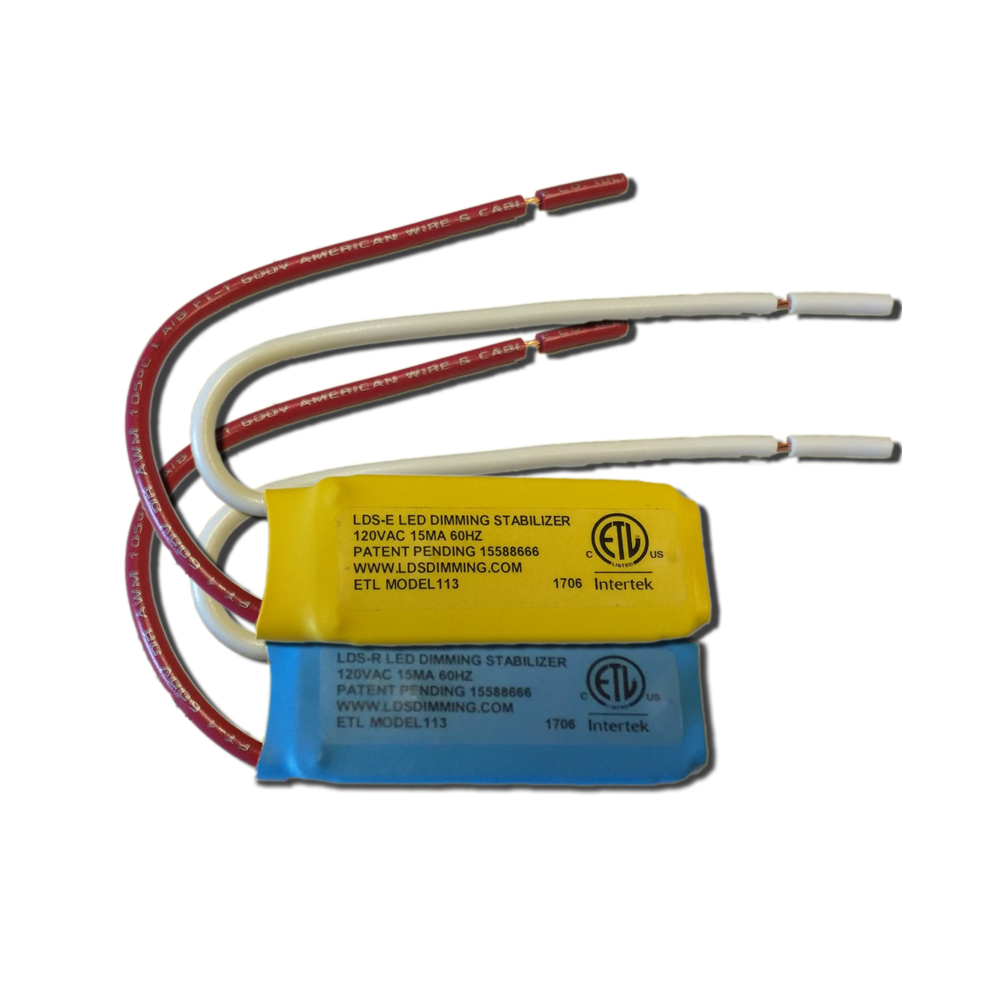
Dimmer switches need a minimum load to work properly. LED bulbs use less power than traditional bulbs. Sometimes the total load is too low for the dimmer. Adding more LED bulbs or a load resistor can fix blinking.
Credit: www.insteon.com
Quick Fixes For Blinking Led Lights
Blinking LED lights on a dimmer can be annoying. This problem often happens because of compatibility or wiring issues. Fixing these problems is usually simple. You do not need expert tools or skills to try these quick fixes.
Switching To Compatible Dimmers
Not all dimmers work well with LED bulbs. Older dimmers may cause blinking. Choose dimmers made for LED lights. These dimmers have the right technology. They provide steady power to the bulbs. This change often stops the blinking immediately.
Upgrading To Quality Led Bulbs
Cheap LED bulbs may blink on dimmers. Quality bulbs have better internal parts. They handle dimmer signals smoothly. Buy LED bulbs from trusted brands. This upgrade can improve light stability and lifespan.
Checking And Repairing Wiring
Loose or faulty wiring causes blinking too. Turn off the power before checking wires. Look for loose connections near the switch and bulb. Tighten any loose wires carefully. Replace damaged wires or connectors. Proper wiring ensures stable electricity flow.
Adjusting Dimmer Settings
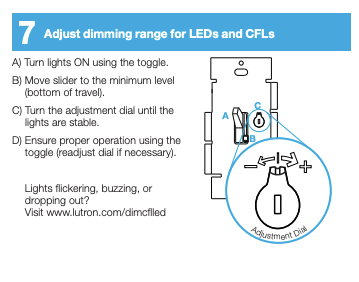
Some dimmers have adjustable settings. These settings control how dimmer works with bulbs. Use a small screwdriver to tweak the dimmer knob. Turn it slowly until blinking stops. Adjusting settings can balance the power for LED bulbs.
Adding A Load Resistor
LED bulbs use less power than older bulbs. This low power can confuse some dimmers. Adding a load resistor adds extra load. It helps the dimmer work correctly. Connect the resistor near the dimmer switch. This fix reduces flickering and blinking.
Expert Tips For Long-term Solutions
Fixing LED lights that blink on dimmers needs smart, long-term steps. Small fixes work only for a while. True solutions stop blinking and keep lights steady. Follow these expert tips for lasting results.
Choosing The Right Dimmer Type
Select dimmers made for LED bulbs. Old dimmers fit only traditional bulbs. Wrong dimmers cause flickering and noise. Check the dimmer’s label to match LED use.
Using Led-specific Dimmers
LED dimmers handle low power better. They give smooth dimming without flicker. Using LED-specific dimmers lowers blinking risks. This keeps your room light calm and clear.
Ensuring Proper Electrical Load
LED lights need a minimum load to work well. Too few LEDs may cause blinking. Add more bulbs or use a load resistor. Balance helps the dimmer work without flicker.
Regular Maintenance Checks
Check wiring and connections often. Loose wires cause blinking and safety issues. Clean dust and dirt from switches regularly. Good maintenance keeps lights bright and steady.
Consulting A Professional Electrician
Hire an electrician for complex problems. Experts find hidden issues in wiring or devices. They install the right dimmer and fix faults safely. Professional help prevents damage and saves money.

Credit: www.support.getzooz.com
Preventing Future Blinking Issues
Preventing LED lights from blinking on a dimmer saves time and frustration. Small steps during installation and maintenance can keep your lights steady. Understanding what causes blinking helps avoid future problems. Follow these practical tips to maintain smooth, flicker-free lighting.
Proper Installation Practices
Correct installation reduces blinking risks. Use dimmers that match LED lights. Check wiring connections carefully. Loose wires cause flickering and damage. Follow the manufacturer’s instructions strictly. Test the setup before finalizing. Proper installation ensures stable light performance.
Investing In Quality Components
Choose dimmers and LEDs from trusted brands. Low-quality parts often cause blinking. Quality components last longer and work better. They handle electrical loads without issues. Spending a bit more prevents frequent replacements. Reliable parts give peace of mind and consistent lighting.
Monitoring Electrical System Health
Regularly inspect your home’s electrical system. Look for signs of wear or damage. Faulty wiring can cause blinking and hazards. Check breakers and outlets for proper function. Keep your system clean and updated. Healthy wiring supports stable LED lighting.
Avoiding Overloading Circuits
Do not connect too many devices to one circuit. Overloaded circuits cause voltage drops. Voltage drops lead to LED blinking on dimmers. Spread electrical loads across different circuits. Know your circuit capacity and respect limits. Balanced loads ensure smooth, flicker-free light operation.
Credit: diy.stackexchange.com
Frequently Asked Questions
Why Do Led Lights Blink On A Dimmer Switch?
LED lights may blink on dimmer switches due to incompatible dimmers or low-quality LEDs. The flicker happens because the dimmer can’t properly control the LED’s power. Using LED-compatible dimmers often fixes this issue.
Can Led Lights Blink Damage The Bulb Or Dimmer?
Blinking can reduce the LED bulb’s lifespan and may strain the dimmer switch. Continuous flickering causes wear on both components. Fixing the problem early helps avoid costly replacements.
How To Stop Led Lights From Blinking On Dimmers?
Use dimmers designed specifically for LED lights to stop blinking. Also, check that your LED bulbs are dimmable. Replacing incompatible parts usually solves the flickering problem.
Does Bulb Wattage Affect Led Blinking On Dimmers?
Yes, using bulbs with wattage outside the dimmer’s range can cause blinking. Low wattage LEDs might not trigger the dimmer correctly. Match bulb wattage with dimmer specifications for smooth lighting.
Are All Led Bulbs Compatible With Dimmer Switches?
No, not all LED bulbs work with dimmer switches. Only bulbs labeled as “dimmable” are made for dimmers. Always check the packaging to ensure compatibility before buying.
Conclusion
LED lights blinking on a dimmer can be frustrating. It usually means the dimmer and LED bulbs don’t match well. Choosing compatible dimmers and bulbs helps stop flickering. Checking wiring and connections also improves performance. Simple fixes often solve the problem quickly.
Bright, steady lighting is possible with the right setup. Keep these tips in mind for better LED dimming. Enjoy your lights without annoying blinking or flickering.