
Is your ChargePoint charger blinking white, and you’re not sure what it means? That little blinking light can feel confusing or even frustrating when you just want to get your electric vehicle charged quickly.
But don’t worry—understanding why your ChargePoint is blinking white can save you time and hassle. You’ll discover what that blinking light means, what to check right away, and how to fix common issues. Keep reading so you can get back on the road without delay.
Credit: www.chargepoint.com
Why Chargepoint Blinks White
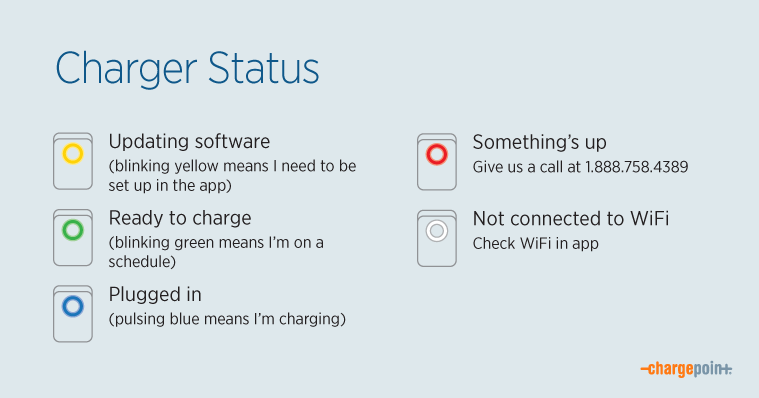
The ChargePoint charger blinking white light often signals a specific status or issue. Understanding why it blinks white helps in troubleshooting and ensuring smooth charging. The white light can mean different things depending on the situation.
It might indicate the charger is trying to connect, updating software, or facing some problems. Knowing the common causes helps you act quickly and avoid long waits. Here are the main reasons behind the ChargePoint blinking white light.
Common Causes
The blinking white light often shows the charger is in standby mode. It means the unit is powered but not actively charging. This status occurs when no car is connected or when the charger is preparing to start.
Another common cause is a connection attempt. The charger tries to communicate with the car or network. This process can take a few moments, during which the white light blinks.
Hardware Issues
Hardware problems can cause the white blinking light to persist. Loose cables or damaged connectors often trigger this signal. Checking the physical setup can help identify such faults.
Internal component failure may also lead to blinking white light. Faulty circuit boards or sensors prevent normal operation. In these cases, professional repair or replacement is necessary.
Software Glitches
Software bugs can cause the white light to blink without clear reason. Sometimes, the charger’s firmware needs an update to fix issues. Restarting the device might resolve temporary glitches.
Network communication errors may also cause blinking. If the charger cannot connect to the server, the white light blinks. Ensuring a stable internet connection helps in such cases.
Credit: www.chargepoint.com
Immediate Steps To Fix The Issue
Seeing your ChargePoint charger blinking white can be confusing. This light often means the charger is trying to connect or has a minor issue. Taking quick action can fix the problem fast. Follow these immediate steps to get your charger working again.
Restarting The Charger
Turn off your charger using the main power switch. Wait for about 30 seconds. Turn the charger back on. This simple step often resets the system and clears minor glitches. Watch the light to see if it stops blinking white.
Checking Power Connections
Make sure the charger is properly plugged into the power source. Look for loose or damaged wires around the plug and outlet. Tighten any loose connections carefully. A steady power supply is key for the charger to work well.
Inspecting The Charging Cable
Check the charging cable for cuts, frays, or other damage. Look at both ends of the cable for bent or broken pins. Replace the cable if you find any defects. A good cable ensures proper communication between your car and charger.
Resetting Your Chargepoint
Resetting your ChargePoint can often solve the blinking white light issue. It helps clear temporary glitches and refreshes the system. There are two reset types: soft and hard. Each one serves a different purpose. Choose the right method based on your ChargePoint’s behavior.
Start with the soft reset. It is quick and safe, causing no data loss. Use the hard reset if the soft reset does not fix the problem. The hard reset is more thorough but may erase some settings.
Soft Reset Process
Unplug the ChargePoint from the power source. Wait about 30 seconds to let it fully power down. Plug it back in and watch the light. This simple step often stops the blinking white light. Your settings stay safe during this process.
Hard Reset Process
Locate the reset button on your ChargePoint unit. It is usually small and recessed. Use a paperclip or pin to press and hold the button. Hold it for about 10 seconds or until the light changes. Release the button and wait for the ChargePoint to restart. This resets the system completely and can fix persistent issues. Note that some custom settings may be lost after this reset.
Troubleshooting With The Chargepoint App
Troubleshooting the Chargepoint blinking white light is easier with the Chargepoint app. The app helps you identify issues fast. It offers tools to fix problems without extra help. You can stay updated and connected through the app. Follow simple steps to get your charger working again.
Firmware Updates
The app checks if your charger has the latest firmware. Firmware controls how the charger works. Outdated firmware can cause blinking white lights. The app lets you download and install updates. Keep the charger software current for best performance.
Connectivity Checks
The app tests your charger’s connection to Wi-Fi or network. A weak or lost connection may trigger the white blinking light. The app shows your charger’s signal strength. You can reconnect or change networks through the app. Good connectivity ensures smooth charging sessions.
Error Code Identification
The app reads error codes from your charger. These codes explain why the light blinks white. The app gives clear descriptions of each error. It suggests simple fixes you can try. Understanding error codes helps avoid long downtime.
When To Contact Support
Knowing the right moment to contact ChargePoint support can save time and reduce frustration. A blinking white light may signal different issues. Some problems need expert help to fix. This section explains when to reach out for support and what signs to watch for.
Signs Of Hardware Failure
A blinking white light might mean hardware issues. Look for these signs:
- The charger does not start charging at all.
- The light blinks continuously without stopping.
- The unit makes strange noises or smells burnt.
- Charging stops suddenly during use.
- The screen or buttons do not respond.
Such signs usually point to hardware failure. Contact support to avoid further damage.
Warranty And Service Options
ChargePoint offers warranty coverage for most hardware problems. Check your warranty terms first. Some repairs or replacements may be free if under warranty.
Support can guide you through service options. They may provide remote troubleshooting or send a technician. Knowing your warranty helps you get the best service quickly.
Preventive Tips For Smooth Charging
Keeping your ChargePoint charger working well is key to smooth charging. Simple steps can stop problems like the blinking white light. These tips help your charger stay reliable and safe every day.
Regular Maintenance
Clean the charger regularly. Dust and dirt can cause errors. Use a soft cloth to wipe the surface. Check cables for any cuts or damage. Replace worn parts quickly to avoid bigger issues.
Inspect the charging port often. Make sure it is free from debris. Look at the screen for any unusual messages. Update the software if updates are available. This keeps your charger running efficiently.
Safe Usage Practices
Always plug and unplug carefully. Rough handling can harm the charger. Avoid charging in wet or extreme weather. Water and heat can cause blinking white light issues.
Use the charger only with compatible vehicles. Different models might not work well together. Follow the instructions in the user manual. This prevents misuse and extends the charger’s life.

Credit: www.reddit.com
Frequently Asked Questions
What Does A Chargepoint Blinking White Light Mean?
A blinking white light on ChargePoint shows it is ready to charge. It means the station is powered on and waiting for a car. No issues detected yet.
How To Fix Chargepoint Blinking White Quickly?
Try unplugging the charger and plugging it back in. Check your internet connection and restart the ChargePoint app. These steps often resolve the blinking light.
Can Blinking White Light Cause Charging Problems?
The blinking white light usually means no problem with charging. But if it stays blinking too long, it may signal a connection issue. Check your car and cable.
How Long Should Chargepoint Blink White Before Charging?
ChargePoint should blink white briefly before switching to solid green. A long white blinking light means it is still connecting. Usually, it takes a few seconds.
When To Contact Support For Blinking White Light?
Contact support if blinking white lasts more than 5 minutes. Also call if your car won’t start charging. Support can help diagnose and fix the issue.
Conclusion
A blinking white light on your ChargePoint can mean different things. It often signals the charger is starting up or waiting to connect. Checking the cable and your app can help find the issue. Restarting the charger sometimes fixes the problem quickly.
Keeping your charger clean and updated helps avoid blinking lights. Understanding these signs makes charging easier and less frustrating. Stay calm, and follow simple steps to get back on the road. Your ChargePoint is ready to serve once the light stops blinking.