
Is your Porter Cable charger blinking red and leaving you stuck with a dead battery? You’re not alone, and this blinking light is more than just a nuisance—it’s your charger’s way of telling you something needs attention.
Understanding what that red light means can save you time, money, and frustration. You’ll discover simple steps to fix the issue and get your tools back up and running quickly. Keep reading to learn how to decode that blinking red light and take control of your charger’s health.

Credit: www.youtube.com
Reasons For Red Blinking Light
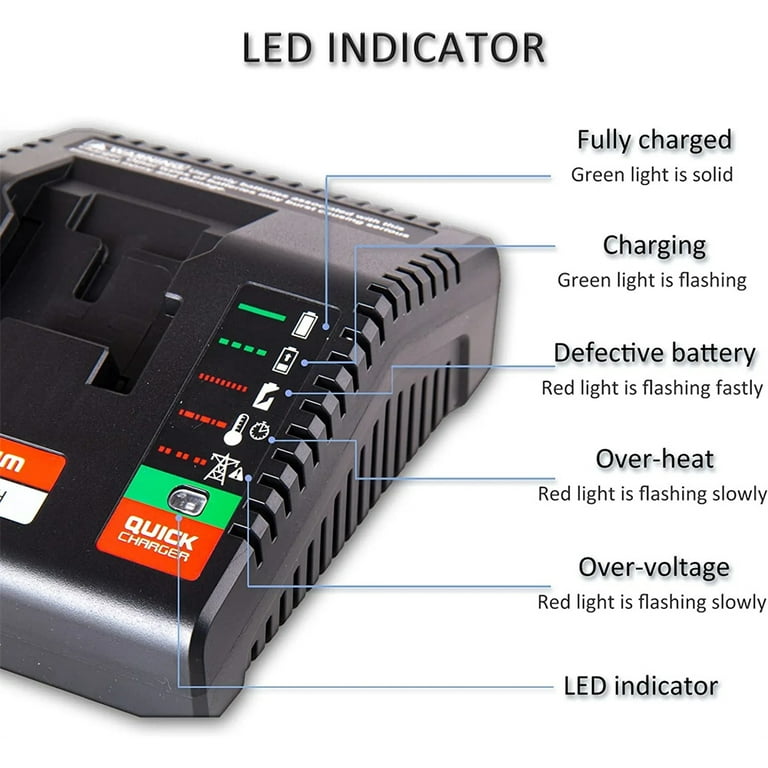
The Porter Cable charger blinking red is a warning signal. It tells you that something is wrong with the charging process. Understanding the reasons helps you fix the issue faster. It also protects your tool and battery from damage.
Battery Overheating
One common reason for the red light is battery overheating. The charger senses heat and stops charging. This prevents damage to the battery cells. Overheating can happen if the battery is used too much without cooling.
Charging in hot places also causes overheating. Let the battery cool down before charging again. This helps the charger work properly.
Faulty Charger Connection
A bad connection between the charger and battery can cause blinking red light. Dirt, dust, or debris on the contacts block the flow of power. Loose connections also stop proper charging.
Clean the contacts gently with a dry cloth. Make sure the battery fits tightly in the charger. Check the charger cable for any damage.
Damaged Battery
Sometimes, the battery itself is damaged. Old or worn-out batteries may not charge correctly. Internal faults cause the charger to blink red as a warning.
Look for swelling or leaks on the battery case. These are signs of damage. Replace the battery if it shows such issues.
Power Supply Issues
The charger needs a steady power supply to work right. A weak or unstable power source can trigger the red blinking light. Power surges or low voltage also affect charging.
Plug the charger into a different outlet. Avoid using extension cords or power strips with poor connections. This ensures a stable power flow for charging.
Basic Troubleshooting Steps
When your Porter Cable charger blinks red, start with basic troubleshooting. These steps help find simple problems fast. Follow them to check the charger and battery before trying complex fixes.
These steps keep your tools working longer. They also save time and money on repairs. Let’s go through each step carefully.
Check Charger And Battery Compatibility
Make sure the charger matches your battery model. Using the wrong charger can cause errors and blinking lights. Check the labels on both the charger and battery. Only use chargers designed for your battery type.
Inspect Charger And Cable For Damage
Look closely at the charger and cable for cuts or frays. Damaged wires can cause the charger to blink red. Check the plug and connectors too. Replace any parts that look worn or broken.
Clean Battery And Charger Contacts
Dirt or dust on contacts stops proper charging. Use a dry cloth to wipe the battery and charger contacts. Remove all dirt and debris. Clean contacts help the charger connect well and work correctly.
Reset The Charger
Unplug the charger from the power outlet. Remove the battery from the charger. Wait about five minutes. Plug the charger back in and place the battery on it again. This reset can clear small glitches causing the red light.
Advanced Fixes To Try
Sometimes basic steps do not fix the Porter Cable charger blinking red issue. Advanced fixes help solve deeper problems. These methods require careful attention and a bit of trial and error. Try each fix one by one. Find the right solution for your charger and battery.
Cool Down Overheated Battery
Overheating causes the charger to blink red. Let the battery rest in a cool place. Avoid direct sunlight or heat sources. Wait at least 30 minutes before charging again. Cooling down prevents damage and resets the battery’s safety mode.
Test With Another Charger
Sometimes the charger itself is faulty. Use a different Porter Cable charger if available. Plug your battery into the second charger. If the light stops blinking red, your charger might be broken. This test helps identify which part needs repair.
Replace The Battery
Batteries wear out over time and stop working properly. A blinking red light may signal a failing battery. Check the battery’s age and condition. If it looks swollen or damaged, replace it. A new battery restores normal charging and tool performance.
Update Charger Firmware
Some chargers have firmware that controls charging functions. Outdated software may cause blinking red lights. Visit Porter Cable’s website for firmware updates. Follow the instructions to download and install updates. Updated firmware can fix bugs and improve charger performance.
Credit: www.walmart.com
Maintenance Tips To Avoid Issues
Keeping your Porter Cable charger working well means good care. Simple steps can stop problems like the charger blinking red. These tips help your charger last longer and work right every time.
Follow these maintenance tips to avoid issues and keep your tools ready.
Proper Charging Practices
Always use the charger that comes with your tool. Plug it into a proper power outlet. Avoid using extension cords with low quality. Charge the battery fully before first use. Do not overcharge the battery. Remove the battery once it reaches full charge. This prevents damage and keeps the battery healthy.
Storage Recommendations
Store your charger and batteries in a dry place. Avoid areas with high humidity or dust. Keep them away from direct sunlight. Use the original case or a protective box. This prevents dirt and moisture from causing damage. Store batteries at room temperature for best results.
Regular Inspection Of Equipment
Check your charger and batteries often. Look for cracks, corrosion, or loose parts. Clean the contacts gently with a dry cloth. Replace damaged cables or parts immediately. Regular checks help catch problems early. They keep your equipment safe and efficient.
Avoiding Extreme Temperatures
Do not charge or store batteries in very hot or cold places. Extreme heat can cause overheating. Cold temperatures reduce battery performance. Room temperature is best for charging and storage. Protect your tools from freezing or direct heat sources. This prevents damage and keeps your charger working well.
When To Seek Professional Help
A blinking red light on your Porter Cable charger can be frustrating. Sometimes, simple fixes work. Other times, the problem needs expert care. Knowing when to call a professional can save time and prevent further damage.
Some issues are not easy to spot or fix. Professionals have the right tools and knowledge. They can find hidden problems and fix them safely.
Persistent Blinking Despite Fixes
If the red light keeps blinking after trying common fixes, it may need expert help. Cleaning the contacts or resetting the charger might not be enough. Persistent blinking can signal a deeper problem inside the charger or battery.
Continuing to use a faulty charger can cause more damage. A professional can properly test the charger and battery. They can decide if parts need repair or replacement.
Signs Of Internal Damage
Visible damage like cracks, burns, or strange smells means stop using the charger. Internal damage can cause safety risks like overheating or electrical shorts. Professionals can safely open the charger and inspect the parts inside.
They can check the circuit board and wiring for faults. Trying to fix internal damage yourself can be dangerous. A trained technician knows how to handle these issues properly.
Warranty And Service Options
Check your charger’s warranty before attempting repairs. Many Porter Cable products come with a warranty that covers defects. Professional service may be free or low cost under warranty terms.
Contact Porter Cable customer service to learn about authorized repair centers. Using authorized services protects your warranty. Professionals can provide genuine replacement parts and proper repairs.
Seeking professional help ensures your charger works safely and lasts longer.

Credit: www.serinar.it
Frequently Asked Questions
Why Is My Porter Cable Charger Blinking Red?
A red blinking light usually means a charging error or battery problem. Check if the battery is properly connected or if it is damaged.
How Can I Fix A Blinking Red Light On My Charger?
Try cleaning the battery contacts and charger terminals. Also, test with another battery to see if the charger or battery is faulty.
Does A Blinking Red Light Mean The Battery Is Bad?
Often, yes. A blinking red light can indicate the battery is too hot, too cold, or defective and may need replacement.
Can Temperature Affect The Porter Cable Charger Light?
Yes. Extreme temperatures can cause the charger to blink red to protect the battery. Charge only in normal room temperature.
Is It Safe To Use The Charger If It Blinks Red?
No, it’s best to stop using it until you find the problem. Continuing could damage the battery or charger.
Conclusion
A blinking red light on your Porter Cable charger signals a problem. Check the battery and charger connections carefully. Clean any dirt or debris that might block charging. Make sure the charger is plugged into a working outlet. Sometimes, letting the charger rest for a while helps.
If the light keeps blinking, the battery might need replacement. Taking these steps can save time and frustration. Stay patient and follow the simple checks to get your tools working again. Your Porter Cable charger will likely return to normal soon.