
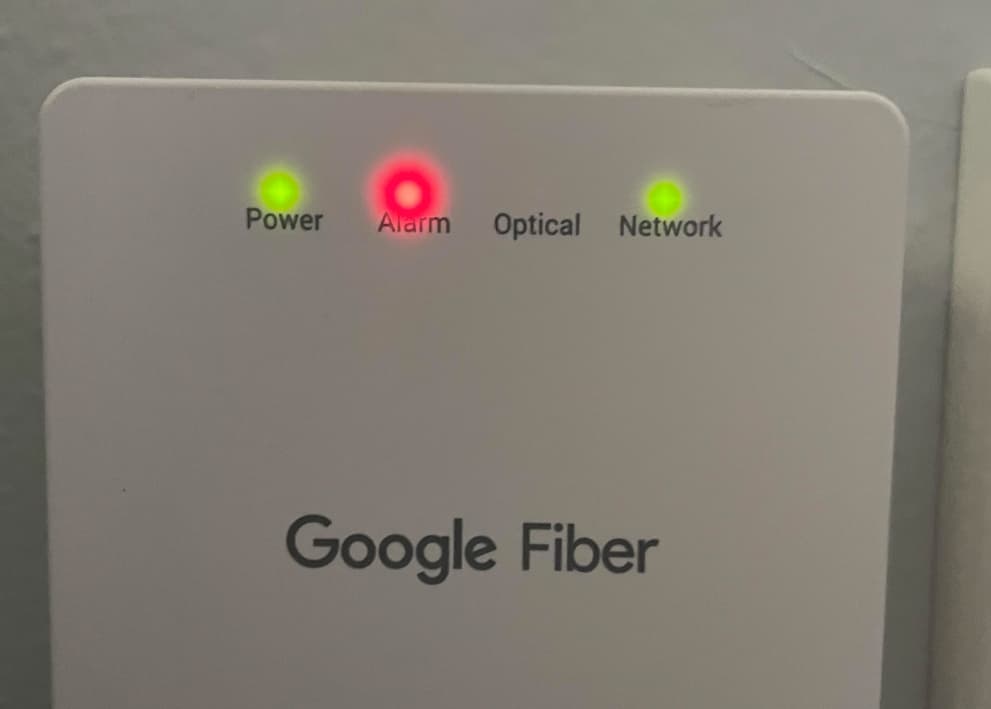
Is your Google Fiber jack blinking red and you’re not sure what it means? This little light can tell you a lot about your internet connection.
When it turns red, it usually signals a problem that could be affecting your service. But don’t worry—understanding why it’s blinking red is the first step to fixing it quickly. Keep reading, and you’ll learn exactly what this warning light means and how you can get your connection back to normal fast.

Credit: www.youtube.com
Causes Of Red Blinking Light
The Google Fiber Jack blinking red light signals a problem in the connection. It alerts you that the device is not working as it should. Understanding the causes can help solve the issue faster. Several reasons can cause the red blinking light on your Fiber Jack.
Power Issues
Power problems often cause the red blinking light. The Fiber Jack may not get enough power. Loose or unplugged power cables can stop the device from working. Sometimes, the power outlet itself may not work. Check the power connection and outlet for any faults.
Connection Problems
Connection issues lead to the red blinking light. The Fiber Jack might lose its link to the fiber network. Damaged or disconnected cables cause poor signal reception. Bad weather or physical damage to cables can disrupt the connection. Ensure all cables are properly connected and intact.
Hardware Malfunctions
Hardware faults inside the Fiber Jack can cause blinking red lights. Internal parts may fail or overheat. Faulty components stop the device from operating normally. In some cases, the device may need repair or replacement. Check for visible damage or unusual sounds.
Service Interruptions
Service outages from your provider cause the red blinking light. Scheduled maintenance or unexpected problems affect your connection. The Fiber Jack shows a red light to warn about service loss. Contact your provider to confirm any ongoing outages in your area.
Credit: www.lily-coiffeuse-a-domicile.fr
Basic Troubleshooting Steps
The Google Fiber Jack blinking red can be frustrating. Basic troubleshooting helps fix common problems fast. Follow these easy steps to try and restore your connection.
Restarting The Fiber Jack
Turn off the fiber jack by unplugging it from the power source. Wait for about 30 seconds. Plug it back in and watch the light. This simple action often clears minor errors.
Checking Power Supply
Make sure the power adapter is firmly connected to the jack and the outlet. Check if the outlet works by testing another device. A faulty power supply can cause the red blinking light.
Inspecting Cable Connections
Look closely at all cables connected to the fiber jack. Ensure they are fully inserted and not loose. Damaged or loose cables can interrupt the signal and cause issues.
Resetting The Device
Locate the reset button on the fiber jack. Use a small pin to press and hold it for 10 seconds. Release and wait for the device to restart. Resetting can fix deeper connection problems.
Advanced Fixes
Advanced fixes help solve persistent issues with the Google Fiber jack blinking red. These steps dig deeper than basic troubleshooting. They target hardware and software problems that may cause the red light.
Try these fixes carefully to avoid extra damage. Follow each step to check if the problem clears.
Firmware Updates
Firmware controls how the Fiber jack works. Outdated firmware can cause errors. Visit the Google Fiber support site for the latest update. Download and install the new firmware. This process can fix bugs and improve performance. Make sure to follow update instructions exactly to avoid new issues.
Replacing Faulty Cables
Cables carry signals between your jack and equipment. Faulty cables cause connection problems and blinking red lights. Inspect cables for damage or wear. Replace any cable that looks frayed or bent. Use cables approved by Google Fiber for best results. New cables can restore a strong connection.
Testing With Alternative Equipment
The problem may come from your connected device. Test the Fiber jack with a different modem or router. This helps find if the original device is faulty. Borrow equipment from a friend or use a spare. If the red blinking stops, the original device needs repair or replacement. This step narrows down the issue source.

Credit: www.reddit.com
When To Contact Support
Knowing when to contact support for a blinking red Google Fiber Jack is important. This light often signals a problem with your internet connection. Some issues fix quickly, but others need expert help. Understanding the right time to call support saves time and stress.
Identifying Persistent Issues
Check if the red light stays on after basic fixes. Restart your Fiber Jack and modem first. If the light blinks red again, the issue might be serious. Problems lasting more than 30 minutes need professional support. Constant blinking means the connection is unstable or lost.
Gathering Diagnostic Information
Before calling support, gather details about the problem. Note when the red light started blinking. Write down any error messages or unusual signs. Check if other devices lose internet at the same time. This information helps technicians diagnose the issue faster.
Preparing For Technician Visit
Clear space near your Fiber Jack for easy access. Have your account information ready for verification. List all troubleshooting steps already tried. Make a note of the red light patterns or changes. Being prepared helps the technician fix the problem quickly.
Preventing Future Issues
Preventing future issues with your Google Fiber jack can save time and frustration. Simple steps help keep your connection stable and avoid red blinking lights. Regular care and attention keep your equipment working well.
Regular Maintenance Tips
Check your fiber jack often for dust and dirt. Clean the area gently with a dry cloth. Avoid using water or cleaning chemicals. Make sure cables are plugged in tightly. Loose connections cause problems. Restart the jack if it blinks red for a short time.
Protecting Equipment From Damage
Place the fiber jack in a safe, dry spot. Keep it away from heat sources and direct sunlight. Avoid bending or twisting the cables. Use cable organizers to prevent tangles. Do not let pets chew on the wires. Handle the equipment with care during moves or cleaning.
Monitoring Connection Status
Check the fiber jack lights daily. Green lights show a good connection. Red blinking means a problem. Use the Google Fiber app to monitor status easily. Regular checks help spot issues early. Contact support quickly if the red light stays on.
Frequently Asked Questions
What Does A Red Blinking Light On Google Fiber Jack Mean?
A red blinking light on the Google Fiber Jack usually signals a connection problem. It means the device is not syncing properly with the network. This often requires a reset or a check of the fiber line.
How Can I Fix Google Fiber Jack Blinking Red Light?
Try unplugging the Fiber Jack for 30 seconds, then plug it back in. Check all cable connections are tight and undamaged. If the red light stays, contact Google Fiber support for help.
Why Does My Google Fiber Jack Keep Blinking Red Intermittently?
Intermittent red blinking can indicate a weak or unstable fiber signal. It might be caused by bad weather, damaged cables, or network issues. Monitoring the light and reporting persistent problems helps resolve it faster.
Can A Power Issue Cause Google Fiber Jack To Blink Red?
Yes, insufficient or unstable power can cause the red blinking light. Make sure your power adapter is properly connected and working. Using a different outlet or adapter can help test this.
Is A Red Blinking Google Fiber Jack A Sign Of Fiber Damage?
A red blinking light can mean fiber cable damage or signal loss. Physical damage to the line or connectors often causes this issue. Inspecting the fiber cable for visible damage is a good first step.
Conclusion
A red blinking Google Fiber jack means a connection problem. Check your cables and power first. Restart the device to refresh the system. If the light stays red, contact support for help. Fixing this quickly keeps your internet running well.
Don’t ignore the red blinking light. Stay calm and follow these simple steps. Your internet will work smoothly again soon.