
Is your Whirlpool dishwasher blinking lights, leaving you confused and unsure what to do next? Those flashing signals are trying to tell you something important about your appliance.
If you ignore them, your dishwasher might stop working properly, causing more hassle and bigger repair bills. But don’t worry—you’re about to learn exactly what those blinking lights mean and how you can fix the issue quickly. Keep reading, and you’ll gain the confidence to handle your dishwasher like a pro.

Credit: www.reddit.com
Common Causes Of Blinking Lights
Blinking lights on your Whirlpool dishwasher can signal various issues. These signals help identify what needs attention. Understanding common causes saves time and effort. It also helps prevent bigger problems.
Here are some frequent reasons for blinking lights on your dishwasher.
Power Supply Issues
Power problems often cause blinking lights. A loose plug or faulty outlet can interrupt power flow. Power surges may also affect the dishwasher’s electronics. Check the power connection and try a different outlet. Ensure the circuit breaker is not tripped.
Door Latch Problems
The dishwasher must detect the door as closed. A faulty door latch or sensor causes blinking lights. Dirt or debris can block the latch from closing properly. Inspect the latch and clean any obstructions. Replace the latch if it is broken or worn out.
Drainage Blockages
Blocked drains stop water from leaving the dishwasher. This issue triggers blinking lights to warn you. Food particles or grease may clog the drain or filter. Remove and clean the filter regularly. Clear any blockages in the drain hose or pump.
Control Board Errors
The control board manages the dishwasher’s functions. Errors in the board cause blinking lights. Moisture or electrical faults can damage the board. Resetting the dishwasher might clear minor errors. Severe damage requires professional repair or replacement.
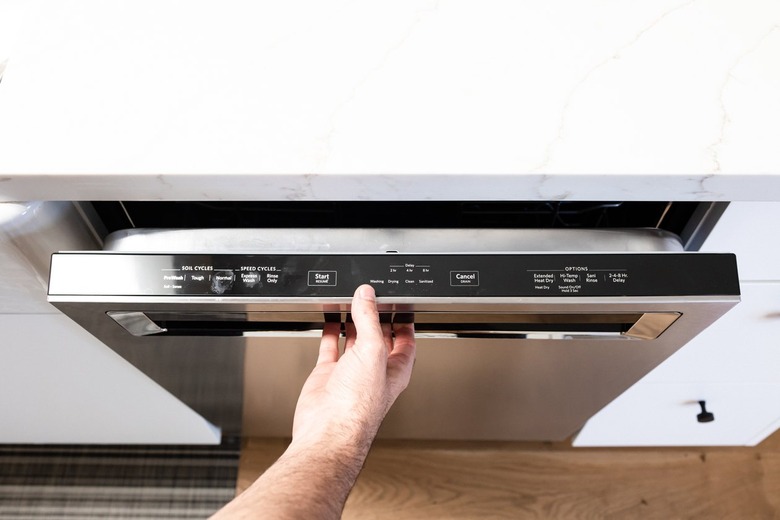
Credit: www.hunker.com
How To Reset Your Dishwasher
Resetting your Whirlpool dishwasher can fix blinking light problems quickly. This process clears minor errors and restarts the system. Two main reset methods exist: soft reset and hard reset. Each method suits different issues. Follow the steps carefully to avoid damage.
Soft Reset Method
Start by opening the dishwasher door. Press the “Cancel” or “Drain” button. Hold the button for about 3 seconds until lights stop blinking. Close the door and wait a few minutes. The dishwasher will reset and clear errors. Try running a new cycle after this.
Hard Reset Method
Turn off the dishwasher by pressing the power button. Unplug the dishwasher from the power outlet. Wait for 5 minutes to let the system fully power down. Plug the dishwasher back in and turn it on. This method resets the internal computer and clears more serious errors.
Fixing Door And Latch Problems
Fixing door and latch problems is key when Whirlpool dishwasher lights blink. These issues often cause the dishwasher to stop working. A door that does not close right or a faulty latch can trigger blinking lights. This section explains how to check the door seal and replace the door latch. These steps can help restore your dishwasher’s function quickly.
Checking The Door Seal
The door seal keeps water inside the dishwasher. A worn or damaged seal can cause leaks. This may also cause blinking lights as the dishwasher detects a problem. Check the door seal for cracks, tears, or dirt. Clean the seal with a damp cloth to remove debris. If the seal looks damaged, replace it to ensure a tight fit. A good seal helps the dishwasher door close firmly.
Replacing The Door Latch
The door latch holds the dishwasher door shut during cycles. A broken latch prevents the door from closing properly. This triggers the blinking lights on the control panel. To replace the latch, first unplug the dishwasher. Remove the screws holding the latch in place. Take out the old latch and install the new one. Secure it with screws and test the door. The dishwasher should start without blinking lights after replacement.
Clearing Drainage And Filter Blockages
Blocked drainage and filters often cause blinking lights on Whirlpool dishwashers. Clearing these blockages helps the dishwasher drain water properly. This improves its performance and stops error signals.
Regular cleaning keeps the dishwasher running smoothly. Dirt, food, and debris can clog the filter and drain hose. Removing these blockages prevents water backup and blinking lights.
Cleaning The Filter
Start by opening the dishwasher door and removing the bottom rack. Locate the filter at the dishwasher’s base. Twist and pull the filter out carefully.
Rinse the filter under running water. Use a soft brush to remove stuck debris. Avoid using harsh tools that can damage the filter.
Check for any food particles trapped inside the filter screen. Clean until the filter looks clear and smooth. Place the filter back securely in its slot.
Unclogging The Drain Hose
Find the drain hose connected to the dishwasher’s drain pump. Disconnect the hose from the sink or garbage disposal.
Inspect the hose for bends, kinks, or visible clogs. Use a long brush or flexible wire to clear inside the hose. Flush it with warm water to remove debris.
Reattach the hose firmly to avoid leaks. Make sure it is not twisted or pressed flat. This allows water to flow freely and stops blinking light errors.
Troubleshooting Control Board Issues
The control board in your Whirlpool dishwasher acts like the brain. It controls all the functions and signals. When the lights blink, it can mean a problem with this board. Troubleshooting control board issues helps you find out what is wrong. This section shows simple steps to check and fix the control board.
Inspecting For Damage
Start by unplugging the dishwasher from power. Open the control panel carefully. Look for signs of damage on the board. Check for burnt spots or broken parts. Loose wires or connectors can also cause problems. Make sure all wires are tight and connected. Use a flashlight to see clearly inside.
Sometimes moisture or dirt can harm the board. Clean the area gently with a dry cloth. Avoid touching any electrical parts directly. If you see corrosion, it might need professional cleaning. Small issues like loose wires can be fixed at home. Take your time and be cautious to avoid more damage.
When To Call A Technician
Some control board problems need expert help. If you find burnt parts or severe damage, call a technician. Complex issues like faulty circuits require special tools. If blinking lights continue after your checks, a professional is best. A technician can diagnose and replace the board safely. Avoid trying risky repairs that could cause more harm. Getting expert help saves time and prevents further damage.
Preventive Maintenance Tips
Preventive maintenance helps keep your Whirlpool dishwasher working well. Small steps prevent blinking lights and costly repairs. These tips save time and money by avoiding common problems.
Simple care routines extend the life of your dishwasher. Staying proactive means fewer interruptions in your kitchen routine.
Regular Cleaning
Clean the filter often to stop blockages. A dirty filter causes blinking lights and poor washing. Remove food scraps and rinse the filter under water.
Wipe door seals with a soft cloth to remove dirt. Dirty seals can cause leaks and error signals. Clean spray arms to ensure water flows freely.
Avoiding Common Mistakes
Do not overload the dishwasher. Overloading blocks water flow and triggers blinking lights. Arrange dishes so water reaches all surfaces.
Use the right detergent amount. Too much or too little detergent causes errors. Follow the manufacturer’s detergent guidelines carefully.
Check water temperature. Water that is too cold affects cleaning and may cause blinking lights. Set your water heater to at least 120°F for best results.

Credit: www.youtube.com
Frequently Asked Questions
Why Are My Whirlpool Dishwasher Lights Blinking?
Blinking lights usually signal an error or issue with the dishwasher. It helps to check the user manual for specific blinking codes. This guides you in identifying the problem quickly.
How Do I Reset Blinking Lights On Whirlpool Dishwasher?
To reset, turn off the dishwasher and unplug it for a few minutes. Plug it back in and turn it on. This simple step often clears minor errors causing blinking lights.
What Does A Blinking Light On Whirlpool Dishwasher Mean?
A blinking light may indicate a problem like a door latch issue or water supply. It acts as a warning to prevent further damage. Checking the dishwasher’s error code helps pinpoint the exact cause.
Can Blinking Lights Affect Dishwasher Performance?
Yes, blinking lights usually warn about issues that can stop the dishwasher from working well. Addressing these signals early keeps the dishwasher running smoothly. Ignoring them might lead to bigger problems.
When Should I Call A Technician For Blinking Lights?
Call a technician if blinking lights continue after a reset or if you see an error code. Persistent blinking could mean a serious issue. Professional help ensures safe and correct repairs.
Conclusion
Blinking lights on your Whirlpool dishwasher signal it needs attention. They help identify problems quickly and clearly. Check your user manual for specific light codes. Many issues can be fixed by simple steps like resetting or cleaning filters. Regular care keeps your dishwasher running smoothly and saves you time.
Don’t ignore blinking lights; they prevent bigger problems later. Stay calm and follow easy troubleshooting tips to fix common errors. Your dishwasher will work well again with a little care and patience.