
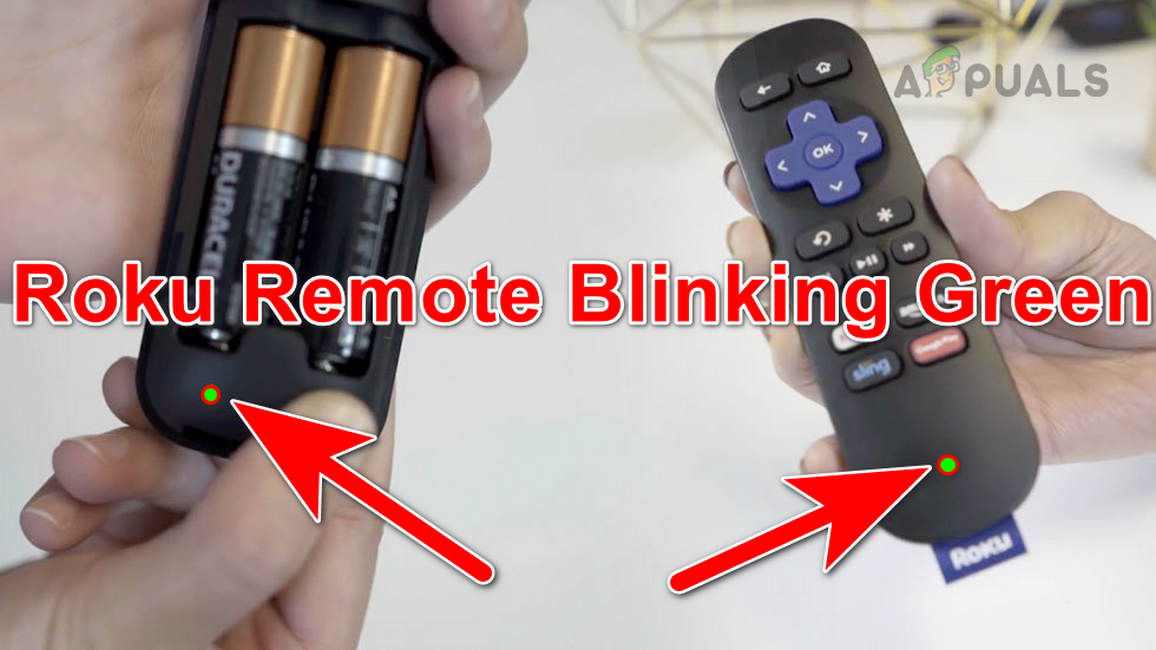
Is your Roku remote blinking green and leaving you frustrated? You’re not alone, and the good news is, this blinking light is a sign that your remote is trying to communicate with you.
Understanding what the green blinking means can save you time and keep your streaming experience smooth. You’ll discover simple steps to fix the issue quickly, so you can get back to enjoying your favorite shows without interruptions. Keep reading to unlock easy solutions that anyone can follow.
Credit: appuals.com
Why Roku Remote Blinks Green
The Roku remote blinking green can confuse many users. This blinking light shows the remote is trying to connect or signal a problem. Knowing why it blinks green helps fix the issue quickly.
This blinking usually means the remote is not syncing correctly with the Roku device. The green light is a signal to check the remote’s status or connection. Several reasons cause this blinking.
Common Causes Of Blinking
The green light blinking often means the remote has trouble connecting. It could be a simple glitch or a deeper issue. Many times, it points to battery problems or connection errors. Understanding these causes saves time and frustration.
Battery And Power Issues
Weak or dead batteries often cause the green light to blink. The remote may try to work but fails due to low power. Replacing batteries with fresh ones can stop the blinking. Always check battery placement too, as loose contacts may cause problems.
Connectivity Problems
The Roku remote uses wireless signals to connect. Interference or distance can cause the green light to blink. Walls, other electronics, or being too far from the Roku device may interrupt signals. Resetting the remote or re-pairing it often solves these issues.
Troubleshooting Battery Problems
Battery issues often cause the Roku remote to blink green. This blinking can mean the remote struggles to connect or power on. Checking the battery is a quick way to fix the problem. Sometimes, the batteries might be weak or dead. Other times, the battery contacts inside the remote could be dirty or corroded. Both problems stop the remote from working well.
Checking And Replacing Batteries
Start by opening the battery compartment on the back of your remote. Take out the old batteries carefully. Check if they look swollen or corroded. Use new batteries of the same size and type. Insert them correctly, matching the + and – signs. Press a button to see if the blinking stops. Good batteries make the remote connect fast.
Cleaning Battery Contacts
Sometimes, dirt or rust stops the battery from working. Use a cotton swab or soft cloth with a little rubbing alcohol. Gently clean the metal contacts inside the battery compartment. Let the contacts dry completely before putting batteries back. Clean contacts help the battery send power properly. This simple step can stop the green blinking light.
Fixing Connectivity Issues
Fixing connectivity issues with your Roku remote is often simple. The blinking green light means the remote is trying to connect. Follow these easy steps to get your remote working again. Each method targets common problems that stop the remote from pairing.
Restarting The Roku Device
Turn off your Roku device by unplugging it from the power source. Wait for about 10 seconds. Plug it back in and turn it on. This restart refreshes the connection between the device and remote. It can clear small glitches causing the blinking green light.
Re-pairing The Remote
Hold the pairing button on your Roku remote for 3 to 5 seconds. This button is usually inside the battery compartment. The remote light will start blinking faster. The Roku device will detect the remote and complete the pairing. This step fixes broken connections and syncing issues.
Using The Roku Mobile App
Download the Roku mobile app on your smartphone. Connect your phone to the same Wi-Fi network as your Roku device. Open the app and select your Roku device. Use the remote feature in the app to control your Roku. This method works if your physical remote is not connecting.

Credit: www.reddit.com
Resetting The Roku Remote
Resetting the Roku remote can fix many common issues, including the blinking green light. This process helps refresh the connection between the remote and the Roku device. It can resolve minor software glitches without needing extra tools.
There are two ways to reset the Roku remote. The first is a soft reset, which is quick and easy. The second is a factory reset, which restores the remote to its original settings. Both steps can solve the blinking green light problem.
Soft Reset Steps
Remove the batteries from your Roku remote. Wait for about 10 seconds. Press and hold the power button on the remote for 15 seconds. Release the power button and reinsert the batteries. Point the remote at the Roku device and press any button. Check if the blinking green light stops.
Factory Reset Instructions
Remove the batteries from the remote. Find the reset button inside the battery compartment. Press and hold the reset button for 10 seconds. Release the button and put the batteries back. Wait for the remote to pair automatically with the Roku device. Test the remote to see if the blinking green light disappears.
When To Replace Your Remote
Knowing when to replace your Roku remote is important. A blinking green light can mean different things. Sometimes, the remote just needs new batteries. Other times, it signals a bigger problem. Replacing your remote at the right time can save frustration and improve your streaming experience.
Signs Of Hardware Failure
One sign is a blinking green light that never stops. Another is when buttons do not respond. The remote may also freeze or work only sometimes. Physical damage, like cracks or broken parts, shows the remote needs replacement. If basic fixes like battery changes do not work, hardware failure is likely.
Choosing A Compatible Replacement
Not all Roku remotes work with every device. Check your Roku model before buying a new remote. Use official Roku remotes for best performance. Third-party remotes may not support all features. Make sure the remote supports voice control if you use it. Compatibility ensures smooth setup and use.

Credit: www.youtube.com
Tips To Prevent Future Blinking
Preventing your Roku remote from blinking green helps keep your streaming smooth. A blinking light can mean your remote has trouble connecting. Simple steps can stop this problem from coming back. Focus on two main areas: battery health and software updates. These tips keep your remote working well for longer.
Maintaining Battery Health
Check your remote’s batteries often. Use fresh batteries to avoid weak signals. Remove batteries if you do not use the remote for a long time. Avoid mixing old and new batteries together. Clean the battery contacts to stop corrosion. Good battery care stops blinking caused by low power.
Keeping Remote And Device Updated
Keep your Roku remote and device updated. Updates fix bugs that may cause blinking. Connect your Roku to the internet regularly. Check for updates in the settings menu. Update the remote software as soon as possible. Updated devices work better and connect faster.
Frequently Asked Questions
Why Is My Roku Remote Blinking Green?
A blinking green light means the remote is trying to pair with your Roku device. This usually happens when the remote is new or reset. Make sure your Roku player is on and nearby.
How Can I Fix A Roku Remote Blinking Green?
Try removing and reinserting the batteries, then press the pairing button again. Restart your Roku device to refresh the connection. Replace old batteries if the light keeps blinking.
Does Blinking Green Mean The Roku Remote Battery Is Low?
Not always. A blinking green light mainly signals pairing mode, not battery status. Check battery health separately if the remote doesn’t respond.
Can Interference Cause Roku Remote Blinking Green?
Yes, interference from other electronics or wireless devices can disrupt pairing. Move the Roku player and remote away from other devices. Keep a clear path between them.
What Should I Do If Roku Remote Won’t Stop Blinking Green?
Unplug your Roku device for 30 seconds, then plug it back in. Press and hold the pairing button for 3-5 seconds until the light flashes. Contact Roku support if the problem continues.
Conclusion
A blinking green light on your Roku remote can feel confusing. It often means the remote is trying to connect or needs new batteries. Try replacing the batteries first. Make sure the remote is close to the Roku device. Restarting the Roku player can also help.
These simple steps usually fix the problem quickly. Staying calm and patient works best. Your Roku remote should work smoothly again soon. Keep these tips handy for any future blinking green light issues.