
Is your garage door opener blinking and leaving you wondering what’s wrong? You rely on your garage door every day, so when that blinking light starts flashing, it can be frustrating and confusing.
But don’t worry—this blinking is trying to tell you something important about your opener’s health. Understanding why your garage door opener is blinking can save you time, money, and a lot of hassle. Keep reading, and you’ll discover simple steps to fix the problem quickly and get your garage door working smoothly again.
Common Causes Of Blinking Garage Door Openers
Garage door openers often blink to show a problem. This blinking can confuse many homeowners. Understanding common causes helps fix the issue fast. This section explains the main reasons behind blinking garage door openers.
Power Supply Issues
Power supply problems cause blinking lights often. Loose plugs or unplugged cords stop electricity flow. Power surges or outages can also affect the opener. Check the outlet and power source first. A steady power supply keeps the opener running smoothly.
Sensor Alignment Problems
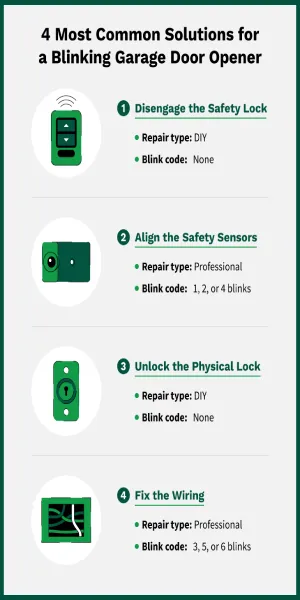
Garage door sensors must face each other directly. Misaligned sensors cause blinking lights and stop door movement. Dirt or spider webs can block sensors too. Clean sensors and adjust their position carefully. Proper alignment ensures safe and correct door operation.
Remote Control Malfunctions
Remote controls may fail and cause blinking lights. Dead batteries stop signals from reaching the opener. Signal interference from other devices can also affect remote function. Replace batteries and avoid signal blockers nearby. Check remote buttons for damage or wear.
Wiring And Circuit Board Faults
Damaged wires or circuit boards can trigger blinking signals. Wires may break or loosen over time with use. Circuit boards can suffer from moisture or electrical faults. Inspect wiring for visible damage and test connections. Professional help might be needed to fix circuit boards.
Checking Power And Wiring
Checking power and wiring is the first step to fix a blinking garage door opener. Power issues or loose wires often cause this problem. A quick check can save time and money. It helps find the exact cause of the blinking light. Here is what to do.
Inspecting The Power Source
Make sure the garage door opener is plugged in properly. Check the outlet for power by plugging in a lamp or phone charger. Look for any tripped circuit breakers in your home’s electrical panel. A power outage or loose plug can cause the blinking light. Ensure the power supply is steady and strong.
Examining The Wiring Connections
Open the garage door opener cover carefully. Look for any loose, frayed, or disconnected wires. Check connections to the motor and control board. Wires can loosen over time due to vibrations. Tighten any loose wires with a screwdriver. Replace damaged wires to avoid shorts or failures.
Resetting The Garage Door Opener
Sometimes a reset clears errors causing blinking lights. Unplug the opener from the power outlet. Wait about 30 seconds before plugging it back in. This resets the system and clears minor faults. After resetting, test the opener to see if the blinking stops.
Fixing Sensor Alignment
Fixing sensor alignment is a common step to stop a garage door opener from blinking. Sensors keep the door safe by detecting objects in its path. Misaligned sensors cause the opener to blink and stop working properly. Realigning them is easy and takes only a few minutes.
Locating The Safety Sensors
Safety sensors sit near the bottom of the garage door tracks. Usually, there is one sensor on each side. They face each other across the door opening. Look for small boxes attached to the track, about six inches above the floor. These are the sensors that need checking.
Realigning The Sensors
Check if the sensors face directly at each other. Slight shifts can cause a blinking light. Gently move one or both sensors until the lights stay steady. Some sensors have small screws or brackets for adjustment. Tighten them once the sensors align perfectly. The blinking should stop immediately.
Cleaning The Sensor Lenses
Dirt or spider webs on the lenses block the sensor’s view. Wipe the lenses gently with a soft cloth. Avoid harsh chemicals that may damage them. Clean sensors help keep the light steady. This simple step often fixes blinking issues fast.
Credit: www.precisiondoor.net
Troubleshooting The Remote Control
Troubleshooting your garage door opener remote control can fix blinking issues quickly. The remote may stop working due to simple problems like weak batteries or signal issues. Checking the remote first saves time and effort before calling a technician.
Replacing Remote Batteries
Start by removing the back cover of the remote. Take out the old batteries carefully. Use fresh batteries of the same type to ensure proper power. Insert the new batteries, paying attention to the plus and minus signs. Close the cover and test the remote. This step often solves blinking and connection problems.
Reprogramming The Remote
Sometimes the remote loses its connection to the opener. Reprogramming restores this link. Find the “Learn” button on the garage door opener motor unit. Press it until the light blinks. Then press and hold the remote button you want to program. The opener light will blink again, confirming the new code. Test the remote after programming.
Testing Remote Signal Strength
Signal strength affects remote performance. Stand close to the opener and press a button. If it works, move farther away and try again. Weak signals may cause blinking lights or no response. Check for obstacles blocking the signal. Replace the remote if the signal remains weak even close to the opener.
Dealing With Circuit Board And Hardware Issues
Garage door opener blinking often signals a problem with the circuit board or hardware. These parts control the door’s movement and safety features. Fixing these issues can stop the blinking and restore proper function. Understanding how to check and reset these components helps save time and avoid bigger repairs.
Start by carefully inspecting the circuit board and hardware. Sometimes, dirt or damage causes the blinking. A reset might fix minor glitches. Knowing when to call a professional ensures safety and proper repair.
Inspecting For Physical Damage
Turn off the power before inspecting. Look for burnt marks or corrosion on the circuit board. Check if wires are loose or broken. Examine the opener’s motor and sensors for any cracks or wear. Dirt or debris can also cause problems. Clean gently with a dry cloth. Damage or heavy corrosion means parts may need replacing.
Resetting The Circuit Board
Resetting can clear minor errors causing the blinking. Unplug the opener from power. Wait about 30 seconds. Plug it back in and watch the lights. Some models have a reset button on the circuit board. Press and hold it for a few seconds. Check the user manual for specific steps. Resetting often stops blinking and resets error codes.
When To Call A Professional
Call a technician if blinking continues after resets. Avoid working on electrical parts if unsure. Complex problems need special tools and skills. Professionals can diagnose and fix hidden faults safely. They also replace damaged circuit boards or parts. Quick professional help prevents further damage or injury.

Credit: www.reddit.com
Preventative Maintenance Tips
Preventative maintenance helps keep your garage door opener running smoothly. It stops problems before they start. This saves money and avoids frustration. Simple steps keep the blinking light from returning. A little care goes a long way.
Regular Sensor Cleaning
Clean the sensors often. Dust and dirt block the signal. Use a soft cloth to wipe the sensors gently. Avoid harsh cleaners that can damage the lenses. Clear sensors ensure the door opens and closes safely. This prevents errors that cause blinking lights.
Scheduled System Testing
Test the garage door opener monthly. Check if the door opens and closes fully. Listen for unusual noises or delays. Press the remote and wall button to confirm response. Early testing finds small issues before they become big. Fixing these stops blinking lights from appearing.
Keeping The Garage Door Tracks Clear
Remove debris from tracks regularly. Dirt, leaves, and small objects block door movement. Use a brush or vacuum to clear the tracks. Ensure rollers move smoothly without resistance. Clean tracks reduce strain on the opener. This helps avoid blinking signals and extends the opener’s life.
Credit: thriftygaragedoorrepair.ca
Frequently Asked Questions
What Does A Blinking Garage Door Opener Light Mean?
A blinking light usually signals a problem with the opener’s sensors or wiring. It can also mean the remote control needs new batteries. Checking these simple issues often solves the problem.
How Do I Fix A Garage Door Opener Blinking Light?
Start by inspecting the safety sensors at the door’s bottom. Clean the lenses and ensure sensors face each other. Replace batteries in your remote if the light keeps blinking.
Can A Blinking Garage Door Opener Stop The Door From Closing?
Yes, blinking lights often indicate sensor problems that block the door from closing. Sensors must align and be clean for the door to work. Fixing sensor issues usually restores normal function.
Why Does My Garage Door Opener Blink After A Power Outage?
After power loss, the opener may blink as it resets or detects errors. Unplugging and plugging it back in can clear the issue. If blinking persists, check the sensors and remote.
Is A Blinking Garage Door Opener Light A Sign Of A Safety Issue?
Yes, blinking often warns of a safety sensor problem or obstruction. The opener stops to prevent accidents. Always check sensors and clear any objects near the door.
Conclusion
A blinking garage door opener light signals a problem. It helps you know when something needs fixing. Check the manual to understand the blinking pattern. Simple issues like sensor misalignment or low batteries often cause blinking. Fixing these can restore your door’s smooth operation.
Regular maintenance prevents future problems and keeps your door safe. Don’t ignore blinking lights—they warn you early. A little attention saves time and money later. Stay alert and keep your garage door working well.