
Is your LiftMaster garage door opener showing a blinking green light, and you’re not sure what it means? That little blinking light can be confusing and even a bit frustrating.
But don’t worry—understanding what your LiftMaster is trying to tell you can save you time and hassle. You’ll discover exactly why the green light blinks and what simple steps you can take to fix it. Keep reading to get your garage door working smoothly again.
Credit: support.chamberlaingroup.com
What The Green Light Means
The green light on your LiftMaster garage door opener tells you important information. It shows the current status of the device. Understanding what the green light means helps with troubleshooting and normal use.
Sometimes the green light blinks or stays steady. Each pattern signals a different message. Knowing these patterns saves time and avoids unnecessary calls for service.
Normal Operation Signals
A steady green light means the LiftMaster is powered and ready. It shows the system is working correctly. When you press the remote, the green light may flash briefly. This means the command was received.
The green light also stays on during the door’s movement. It indicates the opener is running smoothly. Once the door stops, the green light returns to steady. This confirms the door is fully open or closed.
Common Green Light Patterns
Rapid blinking green light often means the system is in programming mode. This occurs when adding or deleting remote controls. A slow blinking green light can signal a safety sensor issue. The sensors might be blocked or misaligned.
Two quick green flashes followed by a pause may indicate a system error. This pattern calls for a reset or further inspection. Noticing these patterns early can prevent bigger problems.
Causes Of Blinking Green Light
The blinking green light on your LiftMaster garage door opener signals an issue. Knowing the cause helps fix the problem faster. Several common reasons trigger the blinking green light.
Power Supply Issues
A faulty power supply often causes the green light to blink. The opener might not get enough power. Check if the outlet works by plugging in another device. Loose or damaged wires can also cut power. Ensure the power cord and plug are secure and in good condition.
Sensor And Wiring Problems
Safety sensors play a key role in garage door operation. If sensors are misaligned, dirty, or blocked, the green light blinks. Wiring issues, like frayed or disconnected wires, also cause blinking. Clean the sensor lenses gently and check wiring connections. Proper sensor function stops the green light from blinking.
Remote Control Interference
Remote controls send signals to the opener. Interference from other devices can disrupt these signals. Other remotes, wireless devices, or even sunlight can cause the green light to blink. Try moving other devices away from the opener. Replace remote batteries and test if the blinking stops.
Quick Fixes To Try
The blinking green light on your Liftmaster opener can be confusing. It often signals a small issue you can fix yourself. This section covers quick fixes that help solve the problem fast. Try these easy steps before calling a technician.
Resetting The Opener
Start by resetting the Liftmaster opener. Unplug it from the power source. Wait about 30 seconds. Plug it back in and watch the light. This simple reset clears minor glitches. The green light may stop blinking and turn solid.
Checking The Power Source
Check the power source next. Make sure the outlet works properly. Try plugging in another device to test it. Inspect the power cord for damage. A loose or broken cord can cause blinking lights. Fix any power issues before moving on.
Inspecting Door Sensors
Door sensors can affect the opener’s light. Look at the sensors on each side of the garage door. Clean any dirt or spider webs on them. Check if the sensors face each other correctly. Misaligned sensors cause the green light to blink. Adjust them until the light stabilizes.
Reprogramming The Remote
The remote may need reprogramming. Press the “Learn” button on the opener. Press a button on the remote within 30 seconds. This syncs the remote with the opener. A blinking green light sometimes means the remote lost connection. Reprogramming fixes this issue quickly.

Credit: www.reddit.com
Advanced Troubleshooting Tips
Advanced troubleshooting tips help solve the LiftMaster blinking green light issue. This guide covers detailed steps to find and fix problems. Follow these tips carefully to avoid damage or safety risks.
Testing The Circuit Board
Start by checking the circuit board for faults. Unplug the garage door opener before testing. Use a multimeter to check voltage and continuity on the board. Look for burnt marks or loose wires. Replace the board if tests show no power or damage.
Replacing Faulty Components
Identify damaged parts like capacitors, sensors, or fuses. Remove the faulty parts carefully using the right tools. Install new components that match the original specifications. Test the opener again to see if the blinking stops. Keep safety in mind when handling electrical parts.
When To Call A Professional
Call a professional if you cannot find the problem. Complex electrical issues need expert knowledge and tools. Professionals ensure repairs meet safety standards. Avoid risks of electric shock or further damage. Hiring help saves time and prevents mistakes.
Preventive Maintenance
Preventive maintenance helps keep your LiftMaster garage door opener working well. It reduces errors like the blinking green light issue. Regular care improves safety and extends the life of your device. Simple steps can prevent many common problems.
Regular Cleaning And Inspections
Clean the opener’s sensors and lens often. Dust and dirt can block signals. Check for loose wires or parts. Tighten screws and bolts as needed. Look for signs of wear or damage. Fix small problems before they grow bigger.
Updating Firmware And Software
Keep your LiftMaster’s firmware up to date. Updates fix bugs and improve performance. Use the official app or website for updates. Regular updates help your opener run smoothly. They can stop blinking lights caused by software issues.
Proper Usage Habits
Avoid forcing the door open or closed. Use the remote or wall control gently. Don’t overload the door with heavy objects. Keep the tracks clear of debris. Proper use helps prevent stress on the opener. It lowers the chance of errors and blinking lights.
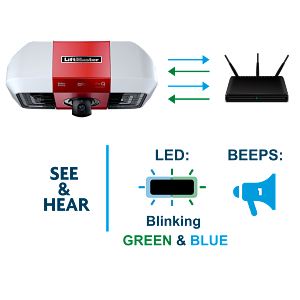
Credit: support.chamberlaingroup.com
Frequently Asked Questions
What Does A Blinking Green Light On Liftmaster Mean?
A blinking green light shows the opener is in programming mode. It means the device is ready to sync with a remote or keypad.
How To Fix Liftmaster Blinking Green Light Issue?
Check the remote battery and signal range first. Reset the opener by unplugging it for 30 seconds, then plug it back.
Can A Blinking Green Light Cause Garage Door Problems?
Yes, it may stop the door from working properly. The light signals communication or sensor issues that need attention.
How Long Should Liftmaster Green Light Blink?
The green light usually blinks for up to 30 seconds during programming. If it keeps blinking, there might be a problem.
Does Blinking Green Light Mean Remote Control Needs Reprogramming?
Often, yes. The blinking shows the opener is waiting for remote syncing. Reprogram your remote to fix the issue.
Conclusion
A blinking green light on your LiftMaster signals it needs attention. Check the power supply and remote batteries first. Resetting the system often solves the issue quickly. Keep the garage door sensors clean and aligned. Regular maintenance helps avoid this problem in the future.
Understanding these simple steps saves time and frustration. Stay calm and follow the guide to fix the blinking green light. Your garage door will work smoothly again soon.