
Is your Pentair Mastertemp 400 showing the wrong temperature? That can be frustrating, especially when you want your pool just right.
You rely on your heater to keep things comfortable, but when the temperature reads off, it throws everything out of balance. Don’t worry—this article will help you understand why this happens and what you can do to fix it. Keep reading to get your pool heater back on track and enjoy perfect water temperature every time.

Credit: www.youtube.com
Common Causes Of Temperature Issues
Temperature problems with the Pentair Mastertemp 400 often stem from a few common causes. These issues affect how the heater reads and controls water temperature. Knowing these causes can help you spot problems early and fix them fast.
Thermostat Malfunctions
The thermostat controls the water temperature. A faulty thermostat can cause wrong readings. It may fail to turn the heater on or off at the right time. This leads to water that is too hot or too cold. Sometimes, the thermostat needs cleaning or replacing.
Sensor Problems
Sensors monitor water temperature inside the heater. If a sensor is dirty or damaged, it sends wrong signals. This confuses the heater’s control system. The result is inconsistent water temperature. Checking and cleaning sensors can solve this issue.
Water Flow Restrictions
Water must flow freely through the heater. Blockages reduce flow and affect heating. Dirt, debris, or closed valves can cause restrictions. Poor flow means the heater cannot warm water properly. Clear any blockages and check valve positions regularly.
Electrical Faults
Electrical problems disrupt the heater’s functions. Loose wires or bad connections cause errors. The heater may fail to heat or shut off unexpectedly. Inspect electrical parts and connections for damage. Fixing electrical faults restores proper temperature control.
Checking The Thermostat Settings
Checking the thermostat settings is important when the Pentair Mastertemp 400 shows the wrong temperature. The thermostat controls the heater’s temperature. If it is set wrong, the water might be too hot or too cold. Simple checks can fix many problems fast.
Start by looking at the thermostat display. Make sure the numbers match what you want. Sometimes the setting changes by mistake. A quick check helps find this easily.
Verifying Temperature Setpoint
First, find the current temperature setpoint on the thermostat. This is the target temperature for your pool or spa. Compare it with the actual water temperature if possible. The setpoint should be close to what you want the water to feel like.
If the setpoint is wrong, change it to the correct temperature. Use the buttons on the thermostat to adjust the number. Save the new setting before leaving the screen. This step often fixes wrong temperature readings.
Resetting The Thermostat
Resetting the thermostat can fix errors or glitches. Turn off the heater completely. Wait for about 30 seconds. Turn it back on to restart the system.
This reset clears minor faults in the thermostat. After restarting, check the temperature setting again. This simple action often helps the heater read the right temperature.
Inspecting And Cleaning Sensors
Checking and cleaning the sensors in your Pentair Mastertemp 400 helps fix wrong temperature issues. Sensors can get dirty or damaged, causing the heater to read temperatures incorrectly. Regular inspection keeps your pool heater working well.
Cleaning sensors removes dirt and buildup that block accurate readings. Sometimes, sensors wear out and need replacement. Careful sensor care improves heater performance and prevents costly repairs.
Locating Temperature Sensors
First, find the temperature sensors on your heater. Usually, they are near the water pipes or inside the heater’s control panel. Check the user manual for exact locations. Sensors look like small metal probes or wires.
Sensor Cleaning Steps
Turn off the heater and unplug it before cleaning sensors. Use a soft cloth or brush to remove dirt from sensor surfaces. Avoid harsh chemicals; warm soapy water works well. Dry sensors fully before putting them back in place.
Replacing Faulty Sensors
Faulty sensors cause wrong temperature readings and poor heater function. If cleaning does not fix the problem, replace the sensor. Buy a sensor that fits your Pentair Mastertemp 400 model. Follow the manual to remove the old sensor and install the new one correctly.

Credit: www.youtube.com
Ensuring Proper Water Flow
Proper water flow is key for the Pentair Mastertemp 400 to maintain the right temperature. Water must move smoothly through the system. Any interruption can cause wrong temperature readings and poor heating. Checking water flow helps keep the heater working well and extends its life.
Checking For Blockages
Blockages in pipes or filters slow down water flow. Leaves, dirt, or debris can clog the system. Check the skimmer basket and pump strainer for trapped debris. Clear any visible blockage carefully. Also, inspect the filter. A dirty filter reduces water flow. Clean or replace it as needed. Good water flow means the heater runs efficiently.
Pump Performance Review
The pump pushes water through the heater. A weak or failing pump lowers flow rates. Listen for unusual noises from the pump. Check if the water pressure is low. Clean the pump basket regularly. Test the pump’s operation by watching water movement. A strong pump keeps water flowing steady. This helps the heater reach the right temperature faster.
Electrical System Troubleshooting
The Pentair Mastertemp 400 may show the wrong temperature due to electrical issues. Checking the electrical system helps find the cause fast. This step is important for safe and proper heater function.
Start with a careful look at all wiring and controls. Small problems in wiring or the control board can cause big temperature errors. Fixing these can bring your heater back to normal.
Examining Wiring Connections
First, turn off the power to the heater. Check all wiring for loose or broken connections. Look for signs of damage or wear on wires. Tighten any loose screws or connectors. Clean off any dirt or corrosion. Faulty wiring can stop signals and cause wrong temperature readings.
Testing Control Board
The control board manages heater functions and temperature. Use a multimeter to test board voltage and signals. Look for burned parts or damaged circuits. Replace the board if tests show faults. A good control board is key to correct temperature control.
Performing A System Reset
Performing a system reset can help fix the wrong temperature issue in your Pentair Mastertemp 400. This step clears any temporary errors and allows the heater to start fresh. It often solves common problems without needing expert repair. Follow these simple actions to reset your system safely and correctly.
Power Cycling The Heater
Turn off the heater by switching off the power at the breaker. Wait for about one minute. This pause lets the system cool and resets internal controls. After waiting, turn the power back on. This basic step can clear small faults causing temperature errors.
Reset Procedures
Locate the reset button on your Pentair Mastertemp 400 control panel. Press and hold the reset button for 10 seconds. Release the button and wait for the system to restart. Watch the display for normal temperature readings. If the problem stays, repeat the reset or check for other issues.
When To Call A Professional
Knowing when to call a professional for your Pentair Mastertemp 400 is important. This heater controls your pool’s temperature. Wrong readings or malfunctions can affect your comfort and safety. Some problems need expert help to avoid damage or injury.
Signs Of Major Issues
Look for frequent temperature changes or no heat at all. Strange noises from the heater signal trouble. Water leaks or error codes on the display also show problems. If the heater shuts off unexpectedly, call a pro. These issues often require special tools and skills.
Safety Considerations
Handling a malfunctioning heater can be risky. Gas leaks or electrical faults may cause harm. Turning off the power and gas supply is crucial before any checks. Professionals know how to handle these dangers safely. Avoid trying to fix complex issues alone to prevent accidents.
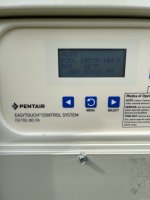
Credit: www.troublefreepool.com
Frequently Asked Questions
What Causes Pentair Mastertemp 400 To Show Wrong Temperature?
Faulty sensors, wiring issues, or control board problems often cause wrong temperature readings.
How Can I Reset Pentair Mastertemp 400 Temperature Settings?
Turn off the heater, wait a few minutes, then turn it back on to reset.
Why Does The Display Show Fluctuating Temperatures?
Fluctuations may result from sensor errors or water flow problems inside the heater.
Can Dirty Sensors Affect Pentair Mastertemp 400 Temperature Accuracy?
Yes, dirt or debris on sensors can cause incorrect temperature readings.
How Do I Test The Temperature Sensor On Mastertemp 400?
Use a multimeter to check sensor resistance according to the user manual.
Is It Safe To Ignore Wrong Temperature Readings On Mastertemp 400?
No, ignoring them can cause overheating or damage to your pool heater.
What Role Does Water Flow Play In Temperature Errors?
Low or uneven water flow can cause the heater to misread water temperature.
How Often Should I Maintain The Temperature Sensor?
Check and clean sensors every 3 to 6 months for best performance.
Can Software Updates Fix Temperature Display Issues?
Sometimes, updating the heater’s software can resolve temperature reading errors.
When Should I Call A Professional For Temperature Problems?
Call a technician if resets and cleaning don’t fix wrong temperature readings.
Conclusion
Pentair Mastertemp 400 showing wrong temperature can cause trouble. Check sensors and wiring first. Clean the heater and remove any debris. Reset the system to see if it helps. Regular maintenance keeps your heater working well. Small problems can turn big if ignored.
Stay calm and follow simple steps to fix. Keep your pool warm and safe all season.