
Your TV won’t turn on, and it’s frustrating. This common issue can have many causes.
Sometimes, the solution is simple and quick. Other times, it may need a deeper look. Understanding why your TV won’t turn on can save time and money. It can also prevent unnecessary stress. Whether it’s a power problem, a remote issue, or something else, knowing the possible reasons helps.
In this guide, we’ll explore common causes and their fixes. So, before you call a technician, let’s see if we can get your TV working again. Keep reading to find out more.
Credit: www.youtube.com
Common Power Issues
Is your TV not turning on? You are not alone. Many people face this issue. Often, it is due to common power problems. Let’s explore these issues and how to fix them.
Power Cord Problems
First, check the power cord. Ensure it is plugged in securely. Sometimes, the cord can become loose. Look for any visible damage. Frayed or broken cords can prevent your TV from turning on.
Replace damaged cords with a new one. This can solve the problem. If the power cord is fine, move on to the next step.
Outlet And Surge Protector
Next, check the outlet. Plug another device into the same outlet. See if it works. If it does not, the outlet may be the issue.
Try a different outlet. Sometimes, outlets fail. If you use a surge protector, ensure it is on. Make sure the surge protector is working. Test it with another device.
These steps can help identify and fix common power issues. They are simple and often overlooked. Check these before calling for professional help.

Credit: 247homerescue.co.uk
Remote Control Problems
Many TV issues start with the remote control. If your TV won’t turn on, the remote may be the problem. It’s easy to overlook. But examining the remote can save time and stress.
Dead Batteries
Dead batteries are a common issue. Check if the batteries are working. Swap them with fresh ones. This simple step often solves the problem. Ensure you use the right type of batteries.
Signal Interference
Signal interference can also stop the remote from working. Objects blocking the signal can cause this. Remove any items between the remote and TV. Other electronic devices can also interfere. Try turning off nearby gadgets.
Tv Settings And Configuration
Understanding your TV’s settings and configuration can help solve many issues, including why it won’t turn on. Small adjustments can sometimes prevent your TV from powering up. Here are some settings to check:
Sleep Timer Settings
Sleep timers automatically turn off your TV after a set period. Check if the sleep timer is active. If it is, disable it. This could be the reason your TV is not turning on.
Input Source Selection
Your TV may be set to an incorrect input source. Ensure it’s set to the correct input, like HDMI or AV. An incorrect input can make it seem like your TV is off. Verify the input source is correct to fix this issue.
Software Glitches
Have you ever had that frustrating moment when your TV refuses to turn on? One of the less obvious culprits might be software glitches. These issues can sneak up on you, causing your TV to act up without any hardware problems. Let’s dive into how firmware updates and factory resets can help you troubleshoot and fix these glitches.
Firmware Updates
Firmware updates are crucial for the smooth operation of your TV. Manufacturers often release these updates to fix bugs, improve performance, and add new features. If your TV isn’t turning on, it might be due to outdated firmware.
Check your TV’s manual or the manufacturer’s website for instructions on how to update the firmware. It’s usually a straightforward process involving a USB drive or an internet connection. Keeping your TV’s firmware up to date can prevent many common issues and extend its lifespan.
Factory Reset
If updating the firmware doesn’t solve the problem, a factory reset might be your next best option. This process will restore your TV to its original settings, erasing any software glitches that might be causing the issue.
Be aware that a factory reset will erase all your saved settings and preferences. Make sure to note down any important information before proceeding. To perform a factory reset, navigate to the settings menu on your TV and look for the reset option.
Have you ever had to perform a factory reset on your TV? Did it solve the issue? Share your experiences and tips in the comments below. Your insights could help others facing the same problem.
Hardware Failures
Experiencing hardware failures could be why your TV won’t turn on. Power issues, faulty cables, or internal defects are common causes. Check the power source and connections first.
Having trouble with your TV not turning on can be incredibly frustrating. One common cause is hardware failures. Understanding these issues can help you diagnose the problem and potentially fix it yourself.Internal Power Supply
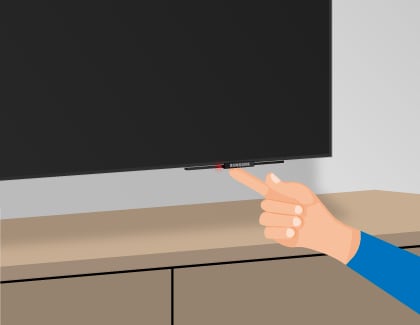
The internal power supply is crucial for your TV to turn on. If it fails, your TV won’t receive power. Check if the power indicator light is on. If it’s off, the issue might be with the internal power supply. You can try unplugging your TV for a few minutes and then plugging it back in. This can sometimes reset the internal power supply. If this doesn’t work, you might need a professional to inspect it.Faulty Components
Another possible issue is faulty components inside your TV. These can range from capacitors to circuit boards. Have you heard any popping sounds or noticed a burning smell? These are signs that a component might have failed. Opening up your TV to check these components can be dangerous if you’re not experienced. It’s often best to leave this to the experts. However, understanding that faulty components could be the issue can help you describe the problem more accurately to a technician. Have you faced these hardware issues before? How did you solve them? Share your experiences in the comments!External Device Interference
Having trouble with your TV not turning on? External device interference might be the culprit. Often, connected devices, cables, and other peripherals can prevent your TV from powering up. Let’s explore how these can affect your TV.
Connected Devices
Connected devices like game consoles, DVD players, or streaming sticks can interfere. If your TV won’t turn on, disconnect all external devices. Try turning the TV on again. If it powers up, one of the devices might be causing the problem.
Hdmi And Other Cables
HDMI and other cables can also affect your TV. Damaged or improperly connected cables might stop your TV from turning on. Check each cable for damage. Ensure they are securely connected. Replace any broken cables to see if your TV powers on.
Environmental Factors
When your TV won’t turn on, you might not immediately think of the environment around it. However, environmental factors can play a significant role in the functionality of your electronics. Let’s look into some specific aspects that might be affecting your TV.
Temperature And Humidity
Extreme temperatures can cause your TV to malfunction. If your TV is in a room that gets too hot or too cold, it might refuse to turn on. TVs are designed to work best in moderate conditions, so consider where you place your TV.
Humidity is another sneaky culprit. High levels of moisture can interfere with the electronic components inside your TV. This is especially important if you live in a humid climate or keep your TV in a basement. You might want to use a dehumidifier to keep the air dry.
Dust And Debris
Dust buildup can lead to overheating and other issues. Your TV has vents to allow heat to escape, and if these vents are blocked by dust, it can cause your TV to shut down. Regularly clean the area around your TV to keep it dust-free.
Debris and pet hair can also find their way into your TV’s internal components. This can cause short circuits or other damage. If you have pets, make sure to clean more frequently. It’s a good idea to use a soft brush or a can of compressed air to gently clean your TV’s vents.
Have you checked the environment around your TV? Simple changes could save you from a frustrating situation. Paying attention to these details can keep your TV running smoothly for a longer time. What steps will you take today to ensure your TV is in the best condition?
Credit: www.samsung.com
When To Seek Professional Help
Persistent issues with your TV not powering on may require professional help. Unresolved problems like faulty wiring or component failure need expert attention.
When to Seek Professional Help Sometimes, troubleshooting your TV at home just doesn’t cut it. There are moments when seeking professional help becomes necessary. This section will guide you on when to call in the experts, ensuring you get your TV back in working order without causing more harm.Warranty And Repair Services
First, check if your TV is still under warranty. Most new TVs come with a one-year manufacturer warranty. If your TV is within this period, contact the manufacturer directly for repair or replacement services. Don’t void your warranty by attempting DIY repairs. It’s worth the wait to have certified technicians handle it. Also, some retailers offer extended warranty plans, so check your purchase records.Finding A Technician
When your warranty is expired, finding a reliable technician is your next step. Look for certified repair services in your area. Local repair shops with good reviews can be a goldmine. Ask friends or family for recommendations. A personal referral can often lead you to trustworthy and skilled professionals. Verify the technician’s credentials before handing over your TV. Ensure they have experience with your TV model and brand. In my experience, a certified technician saved me from a costly mistake. I once tried to fix a power issue myself and ended up making it worse. The technician not only repaired the initial problem but also fixed the damage I caused. It might seem convenient to attempt a quick fix, but professional help can save you time and money in the long run.Frequently Asked Questions
What Can Cause A Tv Not To Turn On?
A TV may not turn on due to power issues, faulty remote control, damaged power cord, or internal hardware problems. Check connections and ensure the power source is working. If issues persist, consult a technician for further diagnosis.
How Do You Fix A Tv That Is Not Turning On?
Check power cable and outlet. Ensure remote batteries work. Try unplugging and replugging. Press power button on TV.
Why Won’t My Tv Turn On When It’s Plugged In?
Check the power cable connection and ensure it’s firmly plugged in. Verify the outlet works by testing with another device. Inspect the TV’s power button and try using the remote. If it still doesn’t work, there might be an internal issue, and you may need professional repair.
Why Won’t My Tv Turn On But The Red Light Is On?
Your TV might not turn on due to a power supply issue or faulty remote. Unplug the TV, wait 60 seconds, then plug it back in. If it still doesn’t work, check the remote batteries or try using the power button on the TV.
Why Is My Tv Screen Black?
A black screen can be due to loose cables or a faulty power source.
Conclusion
Understanding why your TV won’t turn on can be frustrating. Follow these simple steps to diagnose the issue. Check the power source and cables. Try resetting your TV. If the problem persists, consult the user manual or contact customer support.
Sometimes, professional help may be needed. Regular maintenance can prevent future issues. Remember, patience and careful checking often solve most problems. Keep calm and troubleshoot step by step. Your TV might just need a little extra attention. Happy viewing!