
Is your Samsung TV turning off every 5 seconds? This problem can be frustrating.
You might miss your favorite shows and feel helpless. This issue is not uncommon among Samsung TV owners. It can be caused by various factors, such as hardware faults or software glitches. Knowing the potential causes is the first step towards finding a solution.
In this blog post, we will explore the reasons behind this frequent shutdown and offer practical solutions. By understanding the problem, you can take the right steps to fix your TV and enjoy uninterrupted viewing once again. Let’s dive in and get your Samsung TV back on track.
Credit: www.samsung.com
Common Causes
Having your Samsung TV turn off every five seconds can be incredibly frustrating. It interrupts your viewing experience and often leaves you scratching your head, wondering what’s going on. Let’s dive into some common causes that might be behind this annoying issue.
Power Supply Issues
One of the most frequent culprits is a power supply issue. A faulty power cable or an unstable power outlet can cause your TV to turn off unexpectedly. Make sure your TV is securely plugged into a functioning outlet.
Another thing to check is the power cord itself. Over time, these cords can wear out or get damaged. If you see any visible signs of wear, it might be time to replace the cord.
Sometimes, the internal power supply board can also be problematic. If you suspect this is the case, consulting a professional technician might be your best bet.
Overheating Problems
Overheating is another common reason for your Samsung TV to keep shutting off. TVs have built-in systems to prevent damage from overheating, so they will turn off automatically if they get too hot.
Check to see if your TV has enough ventilation. Ensure it’s not placed in an enclosed space where heat can build up. If your TV is wall-mounted, make sure there’s adequate space for air to circulate.
Accumulated dust can also cause overheating. Make it a habit to clean the vents regularly. Use a soft cloth or a can of compressed air to gently remove dust from the vents and other areas.
Could it be that your TV is overheating because of prolonged use? Give it a break and see if the issue persists. Sometimes, simply turning it off for a while can make a big difference.
By addressing these common causes, you might just find the solution to your TV’s troublesome behavior. Have you encountered any other unexpected issues with your Samsung TV? Share your experiences and any fixes you’ve discovered in the comments below!
Initial Checks
Experiencing issues with your Samsung TV turning off every 5 seconds can be frustrating. Before you panic, there are a few initial checks you should perform. These checks might resolve the problem quickly and easily.
Verify Connections
First, make sure all connections are secure. Loose cables can cause power issues. Check the power cord connection to the TV and the wall socket. Ensure HDMI cables are firmly plugged into their ports. Inspect other connected devices for secure connections too. Sometimes, simply tightening a loose cable can solve the problem.
Check Power Source
Next, examine the power source. Is the TV plugged into a working outlet? Test the outlet with another device to confirm it works. Avoid using power strips or surge protectors. They can sometimes cause power interruptions. Plug the TV directly into the wall socket to rule out any issues with the power strip.
Firmware Updates
Your Samsung TV might be experiencing issues due to outdated firmware. Firmware updates are essential for optimal performance. They can fix bugs, improve features, and enhance security. Ensuring your TV has the latest firmware is a crucial step in resolving the issue of it turning off every 5 seconds.
Check Current Version
First, verify the current firmware version on your Samsung TV. Navigate to the settings menu. Select “Support” and then “Software Update.” Here, you will see the version number displayed. Compare it with the latest version available on Samsung’s official website.
Update Firmware
If your firmware is outdated, updating it can solve the problem. Go back to the “Software Update” section. Choose the option “Update Now.” Follow the prompts to download and install the latest firmware. Ensure your TV remains connected to the internet during this process.
Resetting The Tv
Is your Samsung TV turning off every 5 seconds? Resetting the TV might help. Sometimes, a quick reset can solve many issues. You can try a soft reset first. If that does not work, a factory reset might be necessary.
Soft Reset
A soft reset is simple. It refreshes the TV without changing settings. To do this, unplug the TV from the power source. Wait for about 60 seconds. Then, plug it back in. Turn on the TV. This process can clear minor glitches.
Factory Reset
A factory reset restores the TV to its original state. It erases all settings and installed apps. To perform a factory reset, go to the Menu. Select Settings. Navigate to Support. Choose Self Diagnosis. Finally, select Reset. Enter your PIN. The default PIN is usually 0000. Confirm the reset. Your TV will restart as new.
Remember, a factory reset will delete all custom settings. Ensure you have a backup of important data.
Inspecting Hardware
Dealing with a Samsung TV that keeps turning off every 5 seconds can be incredibly frustrating. If you’ve already tried the usual software fixes and nothing seems to work, it might be time to inspect the hardware. Hardware issues are often overlooked but could be the root cause of this problem. Here’s how you can go about it:
Check For Damaged Cables
First, take a good look at all the cables connected to your TV. Damaged or frayed cables could be causing the intermittent power issues. Unplug each cable one by one and inspect them closely.
Are there any visible signs of wear and tear? If so, it’s time to replace those cables. It’s also a good idea to test with new cables to see if the issue persists. Sometimes, even a slightly loose connection can cause the TV to turn off unexpectedly. Make sure all cables are securely plugged in.
Inspect Power Button
The power button on your TV might also be the culprit. A stuck or malfunctioning power button could cause the TV to shut off repeatedly. Press the power button a few times to see if it’s stuck or feels different.
Sometimes dust or debris can get lodged in the button, causing it to malfunction. Use a can of compressed air to clean around the button area. If the button feels loose or unresponsive, it might need professional repair or replacement.
Have you ever found a simple hardware fix that solved an issue you thought was complex? Share your story in the comments. You might just help someone else facing the same problem!
External Device Interference
Is your Samsung TV turning off every 5 seconds? External device interference might be the culprit. Devices like gaming consoles, Blu-ray players, or sound systems can disrupt your TV’s functionality. Resolving this issue is simpler than you think. Follow these steps to identify and fix the problem.
Disconnect External Devices
First, disconnect all external devices from your Samsung TV. This includes HDMI cables, USB drives, and any other connected peripherals. After disconnecting, turn on your TV. If the problem stops, one of the external devices is likely causing the interference. Reconnect each device one at a time to find the faulty one.
Test With Different Inputs
Next, test your Samsung TV with different input sources. Connect another device, like a DVD player or another gaming console, to your TV. If the TV works fine with other inputs, the original device may be the issue. Check the cables and ports for any damage. Sometimes a faulty cable or port can cause the TV to turn off.
Energy Saving Settings
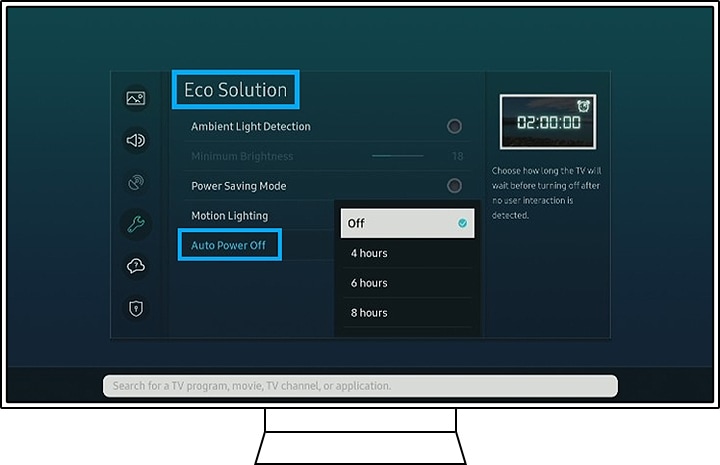
Experiencing your Samsung TV turning off every 5 seconds can be frustrating. One potential cause is the energy saving settings. These settings aim to reduce power consumption, but they can sometimes interfere with the TV’s normal operation. Adjusting or disabling these settings might solve the issue.
Disable Eco Mode
Eco Mode helps save energy by adjusting the TV’s brightness. But, it can cause the TV to turn off unexpectedly. To disable Eco Mode, go to the settings menu. Navigate to General, then to Eco Solution. Turn off the Eco Mode option. This may prevent the TV from turning off frequently.
Adjust Sleep Timer
The sleep timer feature can also cause the TV to turn off. This setting turns off the TV after a set period. Check if the sleep timer is active. Go to the settings menu. Select System, then Time, and finally Sleep Timer. Set it to Off to ensure the TV stays on.
Credit: odac24.com
Seeking Professional Help
If your Samsung TV keeps turning off every 5 seconds, it can be very frustrating. You’ve tried everything, but it won’t stay on. It’s time to consider seeking professional help.
Contact Samsung Support
First, you should contact Samsung Support. They have experts who can help. You can reach them by phone or online chat. Explain your issue clearly. They might offer solutions or direct you to an authorized service center.
Samsung Support can guide you through troubleshooting steps. They might ask you to check certain settings or components. Follow their instructions carefully. If the problem persists, they will recommend the next steps.
Visit Authorized Service Center
If Samsung Support can’t fix the issue, visit an authorized service center. These centers have trained technicians. They can diagnose and repair your TV.
Find the nearest service center through Samsung’s website. Take your TV and any relevant documents with you. The technicians will inspect your TV and identify the problem. They will offer a repair solution or suggest replacement parts.
Authorized service centers ensure high-quality repairs. They use genuine Samsung parts. Your TV will be in good hands. You can trust their expertise to fix the issue.

Credit: www.youtube.com
Frequently Asked Questions
Why Does My Samsung Smart Tv Keep Turning Off Every 5 Seconds?
Your Samsung smart TV may keep turning off due to a faulty power supply, overheating, or software issues. Check for loose cables, update the firmware, and ensure proper ventilation. If the problem persists, contact Samsung support for further assistance.
Why Is My Tv Turning On And Off Every 5 Seconds?
Your TV may be turning on and off due to a faulty power supply, overheating, or a software glitch. Check the power connections and ventilation. Update the TV firmware or reset to factory settings. Contact manufacturer support if the issue persists.
How Do I Fix My Samsung Tv That Keeps Turning Off?
Check the power cable and connections. Update the TV firmware. Disable the sleep timer and eco settings. Perform a factory reset. Consult Samsung support if the issue persists.
Why Does My Samsung Tv Keep Restarting Every 5 Seconds?
Your Samsung TV might keep restarting due to software issues, power supply problems, or hardware malfunctions. Check for firmware updates, inspect the power cable, or contact support for assistance.
Why Does My Samsung Tv Keep Turning Off?
Your Samsung TV might be overheating or experiencing a software glitch. Check ventilation and update firmware.
Conclusion
Solving the issue of your Samsung TV turning off every 5 seconds can be simple. Start by checking the power connections. Ensure your firmware is updated. Try a factory reset if needed. If problems persist, contacting Samsung support may help.
Taking these steps can restore your TV’s functionality. Keep your TV in good condition for longer enjoyment. Thanks for reading and good luck!