
Seeing your Spectrum modem power light blinking can be frustrating. It often signals a problem with your internet connection.
Understanding why the power light blinks can help you resolve the issue quickly. It can be a sign of various problems, from minor glitches to more serious issues. Knowing what each blinking pattern means can save you time and stress.
In this blog post, we’ll explore the common reasons behind a blinking power light. We’ll also provide easy steps to fix the problem. This guide will help you get back online and keep your connection stable. Stay tuned to learn more about your Spectrum modem and how to troubleshoot it effectively.
Credit: www.reddit.com
Common Reasons For Blinking Power Light
Experiencing a blinking power light on your Spectrum modem can be frustrating. This issue can disrupt your internet connection. Understanding the common reasons behind this can help in troubleshooting. Here, we discuss some typical causes that might be responsible.
Loose Connections
Loose connections are a common culprit. Check if all cables are firmly plugged in. Ensure the power cord is secure in the outlet. Verify that the coaxial cable is tightly connected to the modem. A loose connection can easily cause the power light to blink.
Firmware Updates
Firmware updates can also cause the power light to blink. Spectrum modems receive updates periodically. During the update, the power light may blink. This is normal and should stop once the update completes. If it continues, there might be an issue.
Service Outages
Service outages in your area can lead to a blinking power light. Check with Spectrum for any known outages. You can visit their website or call customer service. If there is an outage, the light will blink until the service is restored.
Initial Checks
Experiencing a blinking power light on your Spectrum modem can be frustrating. Before diving into complex solutions, start with some basic checks. These initial checks can often resolve the issue quickly and get your internet back up and running.
Inspecting Cables
First, ensure all cables are securely connected. Loose cables can cause connectivity issues. Check the power cable and the coaxial cable. Both should be firmly plugged in. Examine the cables for any visible damage. Frayed or damaged cables need replacing.
Power Cycling The Modem
Power cycling the modem can help resolve many issues. Unplug the modem from the power source. Wait for at least 30 seconds. Then, plug it back in. Allow the modem a few minutes to reboot. This simple step can often fix a blinking power light.
Advanced Troubleshooting
Dealing with a Spectrum modem power light blinking issue? Basic troubleshooting often resolves the problem. But sometimes, advanced steps are necessary. Here, we dive deeper into advanced troubleshooting methods.
Checking For Firmware Issues
Firmware updates can solve many modem issues. Check if your modem has the latest firmware version. Visit the Spectrum website to find the latest firmware information. Follow their instructions to update it. This process may take a few minutes. Ensure your modem stays connected during the update.
Factory Resetting The Modem
A factory reset can fix persistent issues. Locate the reset button on your modem. Usually, it is a small, recessed button. Use a paperclip or a similar object to press it. Hold the button for about 10 seconds. Release it when the lights on the modem start blinking. This indicates a reset. Your modem will reboot and restore to factory settings. Reconfigure your settings afterward.

Credit: www.youtube.com
When To Contact Support
Experiencing a blinking power light on your Spectrum modem can be frustrating. While some issues can be resolved with simple troubleshooting, there are times when contacting support is necessary. This section will help you identify those moments and prepare the information needed for effective communication with Spectrum support.
Identifying Persistent Issues
A blinking power light on your Spectrum modem can indicate various problems. If the light continues to blink after basic troubleshooting, it might be time to seek help. Common issues include:
- Intermittent internet connectivity
- Frequent disconnections
- Inability to connect to the internet
If you experience any of these problems for more than a day, contacting support is advisable. Persistent issues often require professional intervention.
Gathering Information For Support
Before contacting support, gather some essential information to help the technician diagnose the issue quickly. Here is what you need:
| Information | Details |
|---|---|
| Account Number | Found on your billing statement |
| Modem Model | Located on the modem itself |
| Error Messages | Any messages displayed on your devices |
| Previous Troubleshooting Steps | Actions you have already taken |
Having this information ready can help speed up the support process. It allows the technician to understand the issue better and provide a faster solution.
Preventive Measures
Preventive measures can help keep your Spectrum modem running smoothly. Addressing issues early can prevent problems like the power light blinking.
Regular Maintenance
Regular maintenance is key to preventing modem issues. Dust and debris can clog vents and cause overheating. Clean the modem’s surface and vents weekly. This ensures proper airflow and reduces the risk of overheating. Check connections regularly to ensure they are secure. Loose cables can cause connectivity problems.
Using Surge Protectors
Power surges can damage your modem. Using surge protectors can help. They protect your modem from sudden voltage spikes. Plug your modem into a surge protector. It acts as a shield against electrical surges. This simple step can extend the life of your modem. It can also prevent the power light from blinking due to power issues.
Understanding Modem Lights
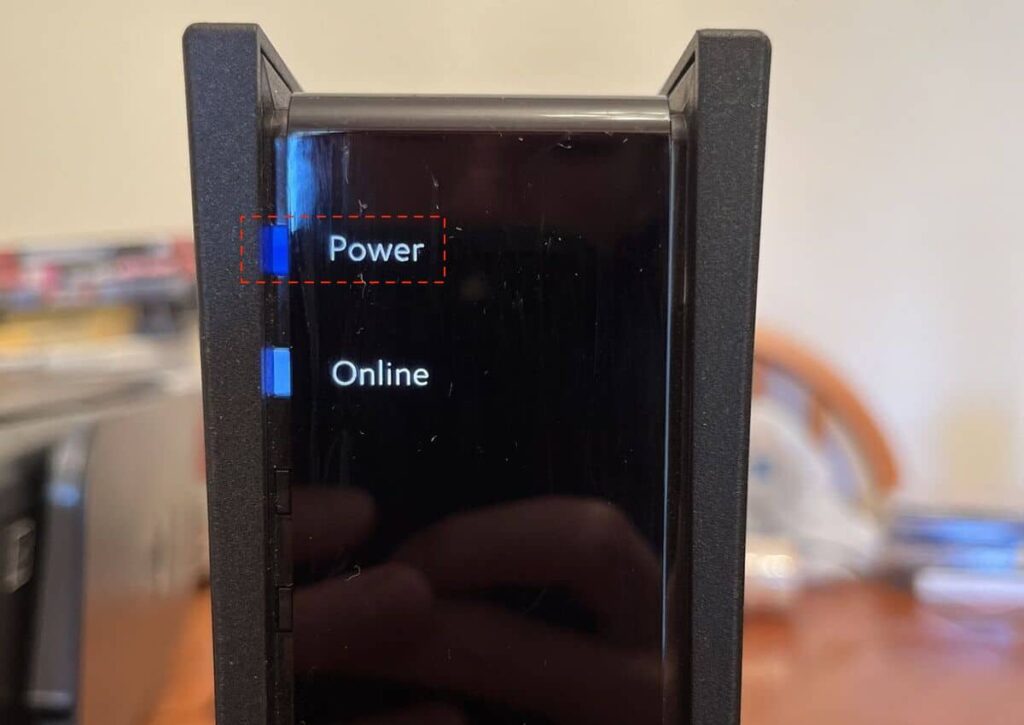
Seeing your Spectrum modem’s power light blinking can be confusing. Different lights on your modem have specific meanings. Understanding these lights helps diagnose issues quickly. Let’s break down the lights and what they signify.
Power Light
The Power Light is the first indicator you should check. A solid power light means the modem is working properly. If it’s blinking, your modem might be restarting or there is a power issue. Here’s a quick guide:
- Solid Light: Modem is powered and operating.
- Blinking Light: The modem is restarting or there’s a power issue.
- No Light: The modem is not receiving power.
Internet Light
The Internet Light tells you about your connection to the internet. Here’s what different states of this light mean:
- Solid Light: The modem is connected to the internet.
- Blinking Light: The modem is trying to connect to the internet.
- No Light: There is no internet connection.
Wi-fi Light
The Wi-Fi Light indicates the status of your wireless connection. Here’s how to interpret it:
- Solid Light: Wi-Fi is active and working.
- Blinking Light: Data is being transmitted over Wi-Fi.
- No Light: Wi-Fi is turned off or not functioning.
Understanding these lights helps you diagnose and fix issues quickly. Always start with the power light, then check the internet and Wi-Fi lights. This simple check can save you a call to customer support.
Credit: www.homeowner.com
Frequently Asked Questions
Why Is My Spectrum Modem Power Light Blinking?
A blinking power light can indicate a firmware update or a connectivity issue.
How Do I Fix My Spectrum Modem’s Blinking Power Light?
Restart the modem. If the light still blinks, contact Spectrum support for help.
Is It Normal For The Spectrum Modem Power Light To Blink?
No, usually a steady light is normal. Blinking suggests a problem or update.
Can A Blinking Power Light Affect My Internet Speed?
Yes, it can. Blinking often means the modem is not fully functional.
Should I Reset My Spectrum Modem If The Power Light Blinks?
Yes, a reset can often solve the issue. Press the reset button for 10 seconds.
Conclusion
Solving the blinking power light issue on your Spectrum modem is crucial. It ensures your internet connection stays stable. Follow the steps mentioned above to troubleshoot. Regularly check your cables and modem settings. If problems persist, contact Spectrum support. They can provide professional assistance.
Keep your modem firmware updated for best performance. A stable internet connection is essential for daily activities. Don’t let a blinking power light disrupt your online experience. Stay connected and enjoy seamless browsing.