
The D light blinking on your Honda often signals a transmission issue. It can be a minor glitch or a serious problem needing attention.
Understanding why this light blinks is important for maintaining your car. It can help you avoid bigger issues down the road. Your car’s transmission is key to its performance. When the D light blinks, it means something isn’t right. This blog post will explore common reasons for the blinking D light.
We’ll help you understand what to do next. Whether it’s a simple reset or a visit to the mechanic, knowing the cause can save time and money. Let’s dive into why your Honda’s D light might be blinking.
Common Causes
Experiencing a blinking D light on your Honda can be concerning. This issue often signals a problem that requires attention. Understanding the common causes can help in diagnosing and fixing the problem.
Transmission Issues
One common cause of a blinking D light is transmission problems. A failing transmission often triggers the D light to blink. Low or old transmission fluid can also cause this issue. Check the transmission fluid level and quality regularly. Faulty sensors in the transmission system may lead to a blinking light. Consider a professional diagnosis to identify any hidden transmission issues.
Electrical Problems
Electrical issues can also cause the D light to blink. A malfunctioning ECU (Engine Control Unit) might be the culprit. This unit controls many vehicle functions, including the D light. Damaged wiring or loose connections can also trigger the blinking light. Inspect the wiring and connections for any visible damage. Replacing damaged components can resolve the issue.
Transmission Fluid Levels
Transmission fluid levels are critical for the proper functioning of your Honda’s transmission system. Low or dirty transmission fluid can cause the D light to blink, indicating a problem. Keeping an eye on your transmission fluid levels can help prevent major issues.
Checking Fluid
First, park your Honda on a level surface. Turn off the engine and let it cool for a few minutes. Open the hood and locate the transmission dipstick. It’s usually near the engine and has a red or yellow handle.
Pull out the dipstick and wipe it clean with a cloth. Insert it back into the tube and pull it out again. Check the fluid level. It should be between the “Full” and “Low” marks. If it’s below the “Low” mark, you need to add fluid.
Refilling Fluid
To refill, you need the right type of transmission fluid for your Honda. Consult your owner’s manual for the correct type. Insert a funnel into the dipstick tube. Pour the fluid slowly to avoid overfilling.
Check the level again by inserting and removing the dipstick. Continue adding fluid in small amounts until it reaches the “Full” mark. Once done, securely replace the dipstick and close the hood. Start the engine and let it run for a few minutes to circulate the fluid.
Sensor Malfunctions
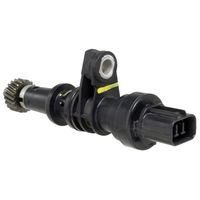
The D light blinking on your Honda can be alarming. One common cause could be sensor malfunctions. Sensors play a crucial role in your vehicle’s operation. They monitor various systems and report any issues to the car’s computer. When these sensors fail, it can lead to the D light blinking.
Faulty Sensors
Faulty sensors are a frequent culprit in causing the D light to blink. Sensors like the speed sensor or transmission fluid sensor can wear out. This leads to incorrect readings, which can confuse the car’s computer. The computer then signals an issue by blinking the D light. Regular maintenance can help spot these problems early.
Sensor Replacement
Replacing a faulty sensor can resolve the blinking D light issue. First, identify which sensor is causing the problem. This usually requires a diagnostic scan. Once identified, the faulty sensor needs replacement. It’s advisable to consult a professional for this task. Incorrect installation can lead to more problems.

Credit: m.youtube.com
Electrical System Checks
When the D light on your Honda starts blinking, it signals a possible issue. One of the first areas to inspect is the electrical system. This check can reveal if a simple electrical fault is causing the problem. Let’s break down the key areas to inspect within the electrical system.
Battery Condition
The battery is the heart of your car’s electrical system. A weak or dead battery might cause the D light to blink. Check the battery voltage with a multimeter. It should read around 12.6 volts when the car is off. If it reads below 12.4 volts, the battery might be weak. Clean any corrosion from the battery terminals. Ensure the battery cables are tight and secure. Replace the battery if it’s old or unable to hold a charge.
Wiring Inspection
Wiring issues can disrupt the electrical flow in your car. Inspect the wiring connected to the transmission control module (TCM). Look for any frayed wires or loose connections. A damaged wire can cause the D light to blink. Ensure all connections are tight and secure. Use a wiring diagram to trace and inspect each wire properly. Repair or replace any damaged wiring to ensure a steady electrical flow.
Diagnostic Tools
When the D light blinks on your Honda, diagnostic tools can help identify the issue. These tools read error codes from your car’s computer. This process pinpoints the problem, saving time and money on repairs.
Obd-ii Scanner
An OBD-II scanner is a handy diagnostic tool. It plugs into your car’s diagnostic port. This port is usually under the dashboard. Once connected, the scanner reads data from your car’s computer. This data includes error codes that help diagnose the problem.
Using an OBD-II scanner is easy. Turn your car’s ignition on, but do not start the engine. Plug the scanner into the diagnostic port. Follow the on-screen instructions to read the error codes. Some scanners even provide a brief description of the code.
Error Codes
Error codes are the language of your car’s computer. Each code represents a specific issue. For example, a code might indicate a problem with the transmission. Another code might point to an issue with the engine. Understanding these codes is key to fixing your car.
After reading the error codes, you can look them up in the scanner’s manual or online. Many websites offer detailed explanations of each code. This information helps you understand the problem better. Sometimes, you might need professional help to fix the issue. But knowing the code gives you a head start in the diagnostic process.
Credit: www.driveaccord.net
Professional Help
A blinking D light on your Honda often signals a transmission issue. Seek professional help to diagnose and fix the problem. Ignoring it might lead to more serious damage.
A blinking D light on your Honda indicates a problem. It’s crucial to address this issue promptly. Ignoring it may lead to serious damage. In such situations, seeking professional help is essential.When To Consult A Mechanic
Consult a mechanic if you notice the D light blinking continuously. This is a sign of a transmission issue. If your car shows any unusual behavior, like hard shifting, get help. Don’t delay. Early intervention can save you from costly repairs.Finding A Reliable Service
Finding a reliable service is crucial. Look for certified mechanics with experience in Honda vehicles. Check reviews online to see their reputation. Ask friends or family for recommendations. A good mechanic will diagnose and fix the issue accurately. Ensure they use genuine parts. This guarantees long-term performance and safety. “`Preventive Maintenance
Preventive maintenance is key to keeping your Honda running smoothly. It can help you avoid the D light blinking issue. Regular check-ups and scheduled servicing are vital.
Regular Check-ups
Regular check-ups can catch small issues before they become big problems. During these check-ups, a mechanic will inspect:
- Fluid levels
- Brake system
- Transmission
- Battery health
These inspections can help identify any problems early. Fixing these early can prevent the D light from blinking.
Scheduled Servicing
Scheduled servicing follows the maintenance schedule in your car’s manual. Each service includes:
| Service Interval | Tasks Performed |
|---|---|
| Every 5,000 miles | Oil change, tire rotation, brake check |
| Every 10,000 miles | Transmission fluid check, spark plug inspection |
| Every 30,000 miles | Full system check, filter replacements |
These services keep your Honda in top condition. They ensure all systems work properly and can stop the D light from blinking.
Performing preventive maintenance is a smart way to avoid costly repairs. Keep your Honda in great shape with regular check-ups and scheduled servicing.
Diy Fixes
Seeing the D light blinking on your Honda’s dashboard can be alarming. But, you can fix many issues yourself. DIY fixes save money and time. Here are some easy steps to solve the problem.
Simple Repairs
First, check the transmission fluid level. Low fluid can cause the D light to blink. Use the dipstick to check the fluid. If it’s low, add more using the correct type.
Another simple fix is resetting the car’s computer. Disconnect the battery for ten minutes. Then reconnect it. This can reset the system and stop the blinking light.
Inspect the transmission solenoids. These small parts can get dirty or worn out. Clean or replace them if needed.
Common Mistakes
One common mistake is ignoring the issue. A blinking D light can indicate a serious problem. Always address it immediately.
Another mistake is using the wrong type of transmission fluid. Always use the type recommended in your Honda’s manual.
Lastly, avoid DIY fixes if you’re unsure about the problem. Consult a professional mechanic to avoid further damage.
Credit: www.cargurus.com
Frequently Asked Questions
Why Is The D Light Blinking On My Honda?
The D light blinking often means a transmission issue. Get it checked soon.
Can I Drive My Honda With The D Light Blinking?
It’s risky. Blinking D light suggests a problem. Driving may worsen it.
How To Fix Blinking D Light On Honda?
Check transmission fluid levels first. If fine, visit a mechanic for a diagnosis.
Is A Blinking D Light Serious?
Yes, it signals a transmission problem. Ignoring it could lead to costly repairs.
What Does The D Light Mean On A Honda?
The D light indicates the drive mode. Blinking means a transmission system fault.
Conclusion
Understanding why the D light blinks on your Honda is crucial. It often signals an issue needing attention. Check the transmission fluid levels first. Inspect for any leaks. If the problem persists, consult a professional mechanic. Ignoring it can lead to bigger issues.
Regular maintenance can prevent such problems. Keeping your Honda in good shape ensures a smooth drive. Always pay attention to warning lights. They help maintain your car’s health. Stay safe on the road.